
Business knowledge: what your WhatsApp assistant knows
Patients ask your WhatsApp assistant the same things all day: do you take insurance, how much is a session, where do I go if there is no branch near me. Business knowledge is the one place where you answer them. Each answer is a card you approve. The assistant then answers only from approved cards, in Morasel's own fixed wording with your answer inside it, and never invents anything. If an answer is missing, not approved or out of date, it hands the chat to your team and tells the patient the part it does know. Business knowledge is for clinics and is available on the web. Morasel switches the assistant's use of your answers on with your clinic; until then the page says so and the assistant works as before.
Open this page in the app https://app.morasel.ai/clinic/knowledge
Who can do what: owners and admins approve answers. Staff can still write an answer, and it goes to the owner as a suggestion ("Sent to the owner for approval"). Medical answers, such as which conditions you treat and the starting fee of a session, can be approved only by the owner, one by one. Morasel's own team cannot approve anything for you.
Specialty packs: if your clinic has several specialties, Business knowledge adds one pack for each (for example Dermatology & Laser, Dental, Mental Health or Vascular). A pack has a few questions patients ask about that specialty. You answer once for the whole department and, where a doctor differs, set the answer for that doctor with Set for a doctor. Patients asking about that doctor read their answer. If you don't have a specialty, patients who ask about it are told it is not offered here, with the specialties you do have.
Other questions: anything unique to your clinic goes in Q&A, written in your own words in Arabic and English. The custom items you already had in the assistant's menu appear there as approved answers, and you keep editing them from the menu editor: the assistant always uses the item's current text, and an item you switch off or delete is no longer used. When a question fits a typed field better, Morasel offers Move to a typed field. If a Q&A answer mentions a fee, a time or a day, Morasel suggests putting it in its own field instead (Prices and services, Hours), where the assistant always uses the current value.
Suggestions from your chats: this list holds answers waiting for approval. Today they come from two places: your existing menu items, when one fits a typed field better (Move to a typed field), and your team's edits, when a staff member writes an answer. Morasel does not read your chats or write answers by itself, and nothing in a suggestion is used until the owner or an admin approves it (a medical answer, only the owner).
What the assistant does: it answers only approved answers, in Morasel's fixed wording with your answer inserted and your optional note added as written. Anything missing, rejected, not approved or past its review date goes to your team, together with the part it does know, such as the branch phone number. It never gives medical advice.
Review dates: every approved answer shows a Review by date. Fees are due for review after 90 days, policies after 180 days, and contact details and places after 365 days. After the date the card says Stale and the assistant still answers for another 30 days. After that, the answer is not used and the question goes to your team until you click Still right? or edit it.
On your device
Web
Open Clinic → Setup and click Open on the Business knowledge card, or go to Business knowledge from the Clinic menu. Click Guided setup.
What you should see: The setup wizard opens, one step at a time (contact and places, hours, booking, fees and payment methods, insurance and hospitals, doctors and conditions), and ends on Review. On a polyclinic, a step called Your specialties comes second.
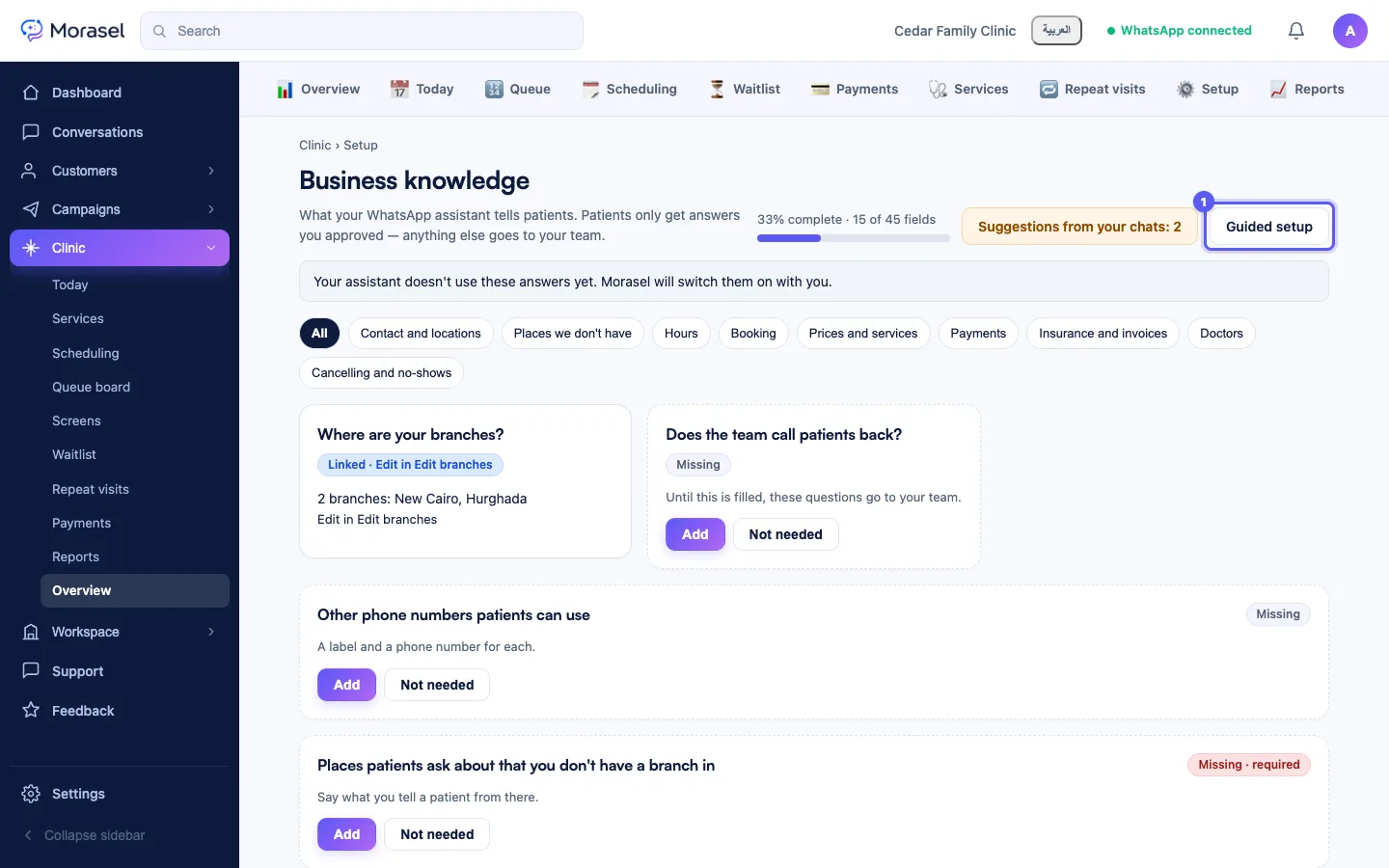
In each step, answer the cards and click Next (it names the next step). Next saves what you changed: approved straight away if you are the owner or an admin (a medical answer only by the owner), or sent to the owner as a suggestion if you are on the team.
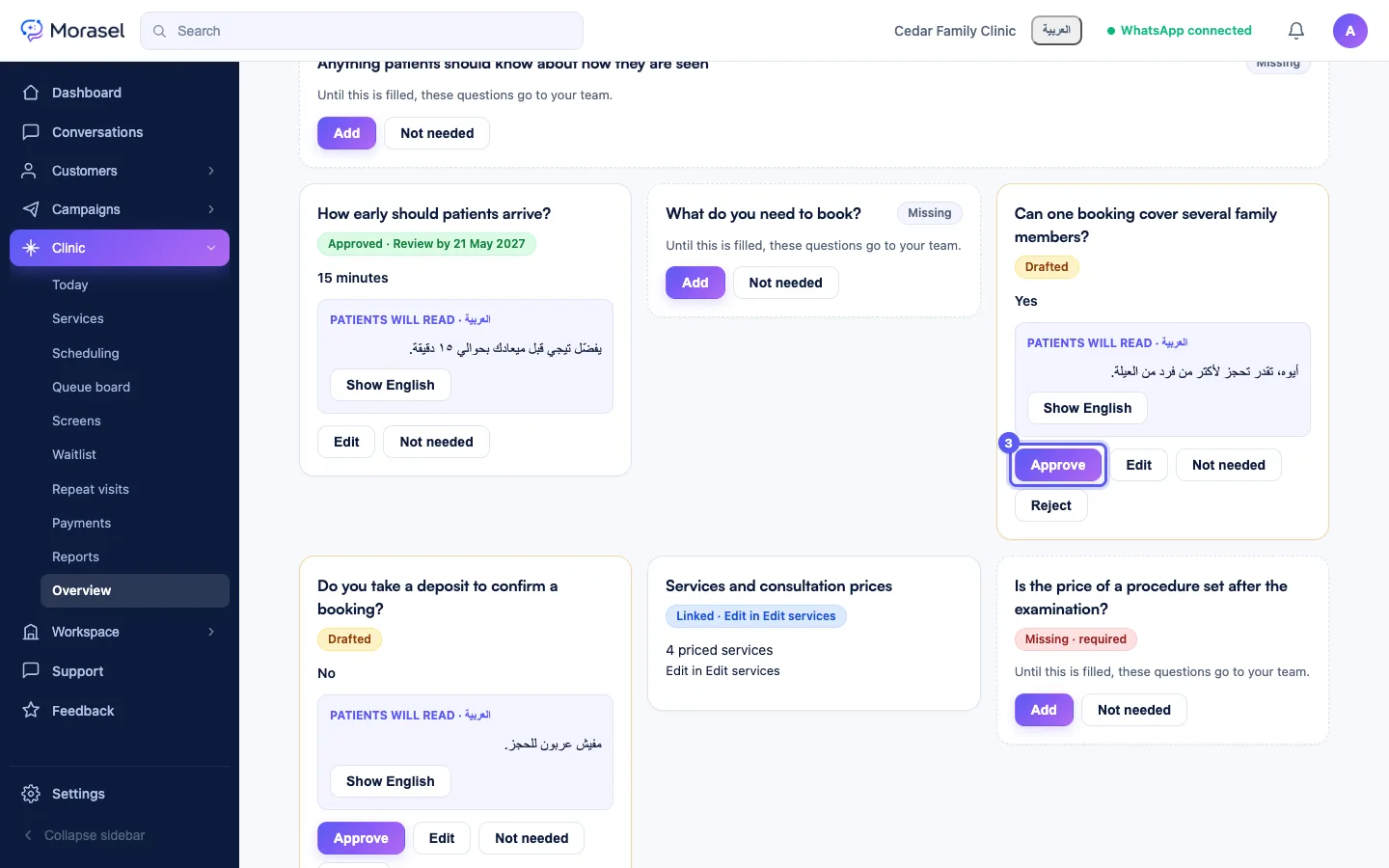
What you should see: The card shows its status (Approved, Drafted, Missing, Stale or Linked) and, under Patients will read, the exact words the assistant will send, Arabic first and English behind Show English.
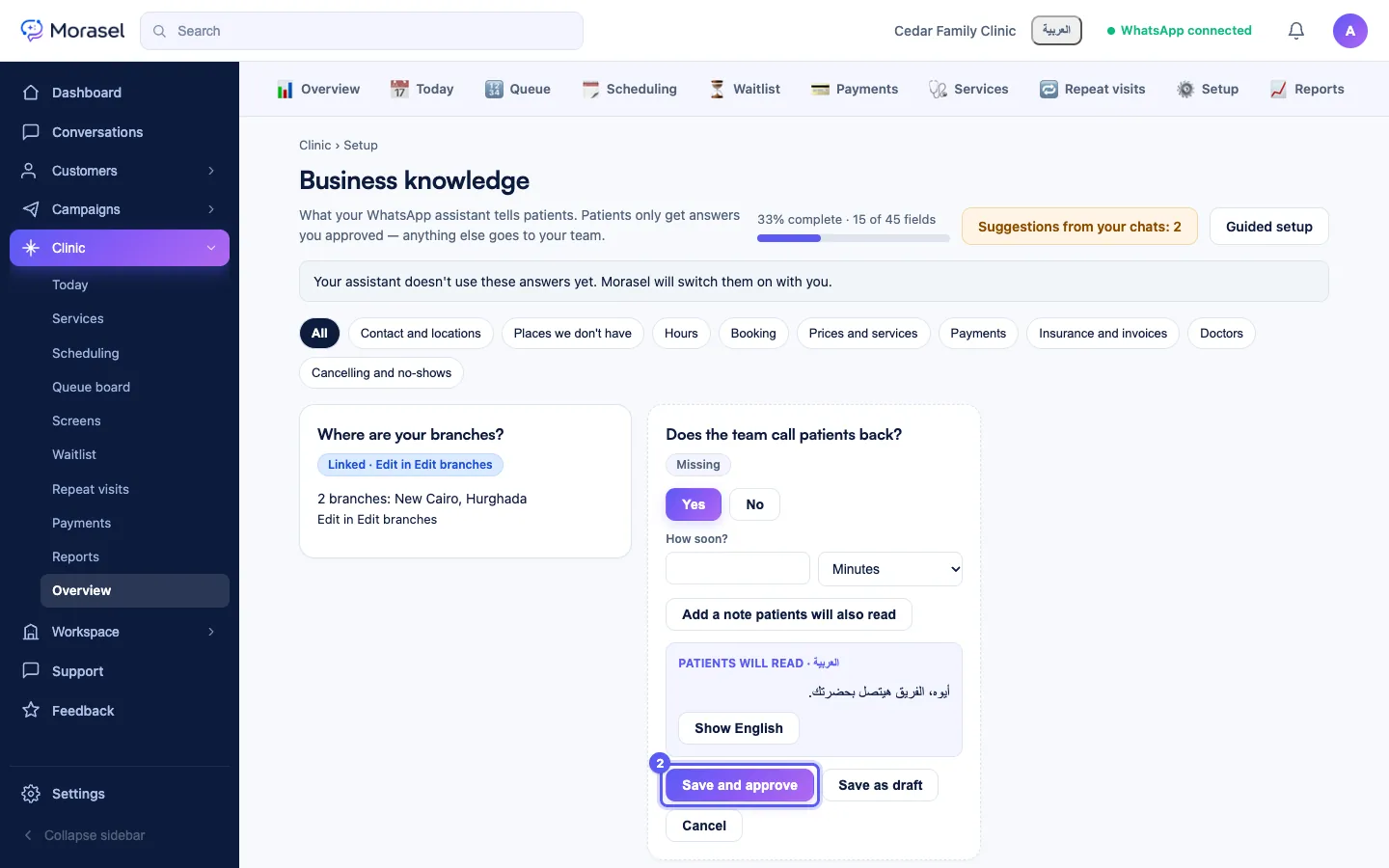
Open Business knowledge and look at the cards that say Missing or Drafted. Click Approve on the ones that are right.
What you should see: Approved cards show "Approved · Review by" and a date. Cards that Morasel already knows from your setup (branches, working days, services, doctors) say Linked and send you to the place where you edit them.
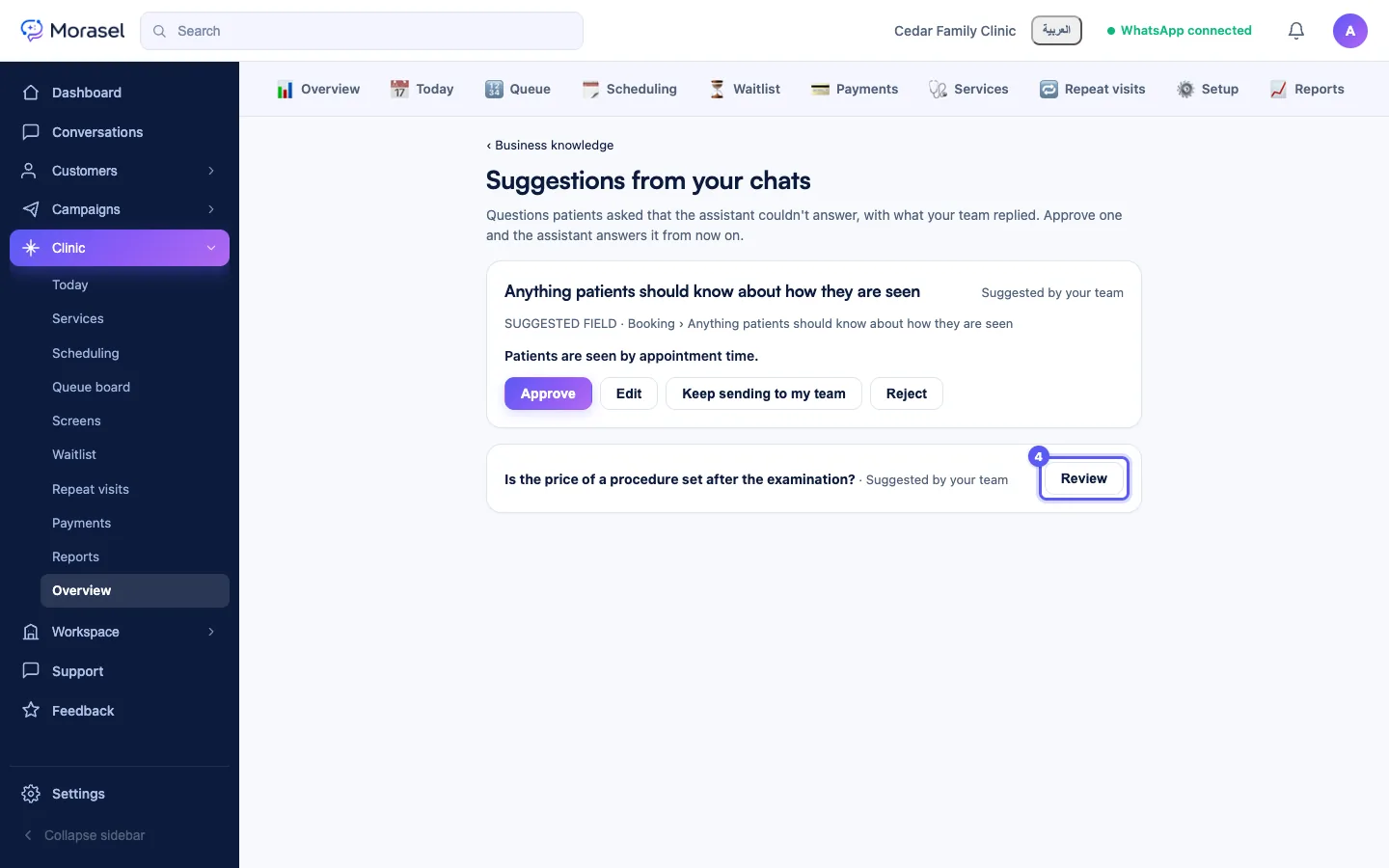
Open Suggestions from your chats and click Review on a suggestion.
What you should see: You see where the suggestion came from (one of your menu items, or an answer your team wrote) and the field it belongs to. Approve it and the assistant answers it from then on, Reject it, or choose Keep sending to my team.


If it didn't work
- I don't see Business knowledge.
- It appears on the web for every clinic workspace whose clinic profile is set up (Clinic → Setup).
- The page says my assistant doesn't use these answers yet.
- If the page says so, that is expected: you can write and approve answers today, and your WhatsApp assistant starts using them when Morasel switches them on with you. Until then it answers patients as before and hands these questions to your team.
- I saved an answer but patients still get sent to my team.
- A drafted answer is not used. Open the card and click Approve (or Save and approve). Cards that say Missing, Rejected or Expired are not used either.
- I can't approve a card.
- Only the owner or an admin can approve, and medical cards only the owner. As staff, click Send to the owner and they approve it.
Frequently asked questions
What is Business knowledge in Morasel?
A page in a clinic's workspace where the owner answers what patients ask, such as insurance, fees, how to book and which conditions you treat, and approves each answer. The WhatsApp assistant answers only from approved answers and hands everything else to the team.
Will the assistant make up answers?
No. It uses Morasel's fixed wording with your approved answer inside it, plus your note word for word. If the answer is missing, not approved or out of date, it tells the patient what it knows and hands the chat to your team.
Does the assistant learn from my chats by itself?
No. Suggestions come from your own menu items and your team's edits, never from reading your chats, and nothing from them is used until the owner or an admin approves it.
Who can approve an answer?
The owner and admins. Staff answers become suggestions the owner approves. Medical answers need the owner, one by one.
Is it available on the phone apps?
Not yet: Business knowledge is available on the web. Online stores have their own Business knowledge, in Settings.
Last updated · Online stores now have their own Business knowledge, in Settings. Fixed: guided setup saves each step with Next.