
WhatsApp appointment reminders that patients can confirm
Morasel schedules a WhatsApp reminder for every appointment, 24 hours before it. The reminder has Confirm, Reschedule and Cancel buttons. When the patient taps Confirm, the appointment changes from Scheduled to Confirmed on your schedule, so reception can see at a glance who has confirmed and who has not.
WhatsApp booking is on for every clinic as soon as its WhatsApp number is connected.
What Morasel automates, and what stays with your team
Every appointment booked in Morasel — by the patient on WhatsApp or on your booking page, or by your team on the web or in the iOS and Android apps — gets one reminder, scheduled for 24 hours before the visit. It goes out automatically on WhatsApp, in the patient’s language (English or Arabic), with the clinic’s name, the date and the time, and never the reason for the visit.
What the patient does with it is recorded on the appointment: Confirm sets it to Confirmed, Reschedule moves it to a free time with the same doctor, Cancel cancels it after a confirmation question. If the patient does not reply, nothing changes automatically — the appointment stays Scheduled, and your team decides whether to follow up.
How the reminder behaves today
The questions clinics ask before relying on automated reminders, answered from how the product works now.
| Question | In Morasel |
|---|---|
| What creates the reminder? | Booking the appointment. Every appointment with consent to appointment messages gets one: WhatsApp bookings always, bookings made by your team by default, and booking-page bookings when the patient ticks the box. |
| When is it sent? | It is scheduled for 24 hours before the appointment and goes out in Morasel’s next sending run, which happens every two hours — so it usually arrives between 22 and 24 hours before. |
| Can we change the timing or add a second reminder? | Not today. There is one reminder per appointment, at 24 hours; there is no same-day or second reminder, and the wording is fixed. |
| What does it say? | “Hello [patient], a reminder of your appointment at [clinic] on [date] at [time]. Use the buttons below to confirm, reschedule, or cancel.” Nothing about the reason for the visit. |
| Who does not receive it? | Patients who asked to stop messages (replying STOP, or marked by your team), appointments booked without consent to appointment messages, and patients with no WhatsApp number. Nothing is sent to them, and reception needs to remind them another way. |
| Which language? | The patient’s saved language in the clinic’s WhatsApp assistant (English or Arabic), otherwise the clinic’s default language. |
| Booked less than 24 hours ahead? | The reminder is already due, so it goes out in the next sending run, as long as the visit has not started. A booking made very close to its time may get no reminder. |
| Changed after the reminder was sent? | A reschedule gets a new reminder for the new time. A cancellation stops any reminder that has not been sent yet. A reminder already sent stays in the conversation. |
| Where do staff see it? | In the patient’s WhatsApp conversation in the shared inbox, with WhatsApp’s sent, delivered and read ticks. A reminder that was not sent (for example, an opted-out patient) does not appear there. |
From booking to Confirmed
One appointment, from the moment it is booked to the patient’s reply. The steps for moving or cancelling are on the reschedule and cancel page.
The appointment is booked
It appears on the schedule as Scheduled, with the doctor, time and branch. If your team booked it, the patient also gets a booking confirmation message straight away.
The reminder is scheduled
Morasel sets it for 24 hours before the start time. Nobody has to remember to send it.
The reminder is sent
In the next sending run after it falls due, on the clinic’s WhatsApp number. It appears in the patient’s conversation in the shared inbox.
The patient replies with a button
Confirm, Reschedule or Cancel. Each button acts on the patient’s next upcoming appointment.
The status updates
Confirm changes Scheduled to Confirmed on Today and the schedule, on the web and in the iOS and Android apps. The patient gets “✅ Your appointment is confirmed. See you then!”.
What reception sees
Real screenshots from a Morasel workspace filled with fictional data. The app is in English (and Arabic).
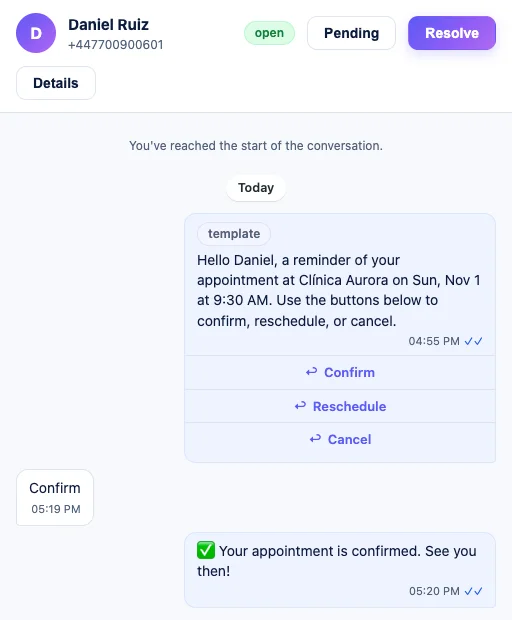
What staff see in the inbox after a patient confirms from the reminder (web app, shown in English). Fictional data. 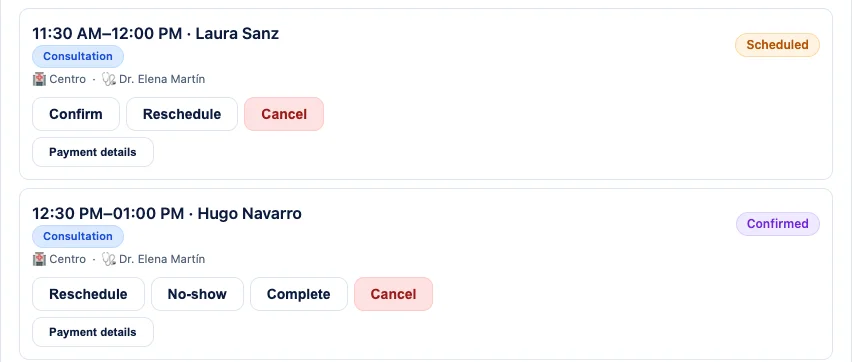
Scheduled and Confirmed side by side on the day view (web app, shown in English). Fictional data.
A booking message is not a confirmed appointment
Three messages can reach the patient around a booking, and only one of them can change the appointment’s status. Telling them apart is what makes “Confirmed” mean something.
| Message | When it is sent | What it says | Does it change the status? |
|---|---|---|---|
| Booking acknowledgment (in the WhatsApp chat) | Straight after the patient books in WhatsApp | “✅ Your appointment is booked. We’ll send you a reminder before your visit.”, plus the address or map link if the clinic set one | No — the appointment is Scheduled |
| Booking confirmation message | Straight after your team books an appointment for the patient | “Hi [patient], your appointment at [clinic] is confirmed for [date] at [time]. We’ll remind you before your visit — reply here to make any changes.” | No — despite the wording, the appointment stays Scheduled until the patient confirms |
| Reminder | Scheduled for 24 hours before the appointment | The date, time and clinic, with Confirm, Reschedule and Cancel | Only when the patient taps a button: Confirm → Confirmed |
An appointment becomes Confirmed in two ways: the patient taps Confirm (on the reminder or under My appointments in the clinic’s WhatsApp menu), or a staff member with the right permission confirms it on the web or in the apps — for example after a phone call.
A reply typed in words, such as “yes, see you tomorrow”, is a message in the conversation for your team to read; it does not change the status by itself.
What the patient receives
Two moments around one appointment: the reminder and the patient’s confirmation, and the message a patient gets when reception books for them.
This is the product’s own English wording; patient messages are sent in English or Arabic. Names, clinic and dates are fictional, and the conversations are shortened.
Reminder and confirmation
Scheduled for 24 hours before the appointment. Confirm changes the status to Confirmed.
Illustrative example — nothing shown here is a real business, person or message. Booked by reception
Sent straight away when your team books the appointment. The status stays Scheduled until the patient confirms.
Illustrative example — nothing shown here is a real business, person or message.
When the patient does not reply
Morasel does not chase patients. An unanswered reminder leaves the appointment as Scheduled, and no task or alert is created for your team — so the useful habit is to check the day’s Scheduled appointments and decide who to contact.
- Today shows which appointments are still Scheduled and which are Confirmed
- No second reminder is sent, and nothing is cancelled automatically
- Reception can message the patient from the shared inbox or call them, and confirm the appointment for them
- A reminder that could not be sent at all (no consent, opted out, no number) does not appear in the conversation, so those patients need another channel
What is available today
| Capability | Status |
|---|---|
| One WhatsApp reminder per appointment, scheduled 24 hours before | Available |
| Confirm, Reschedule and Cancel buttons, with the status updated on the schedule | Available |
| Booking confirmation message when your team books an appointment | Available |
| Reminder and status visible on the web and in the iOS and Android apps | Available |
| Choosing a different reminder time, a same-day reminder or a second reminder | Not currently available |
| Editing the reminder’s wording | Not currently available |
| Reminders by SMS or email | Not currently available |
| Offering freed times to waiting patients (waitlist) | Available |
“Selected pilot” means the feature is built but switched on only for clinics in the pilot programme, with specific activation.
These taps are answered by Morasel's WhatsApp booking assistant, which is on for every clinic as soon as its WhatsApp number is connected.
Reminders are included in every clinic plan
Clinic plans start at $49/month, with a 14-day free trial and no card. Every paid plan includes the schedule, reminders and confirmations; plans differ by capacity.
- WhatsApp messages, reminders included, are charged separately from a prepaid message balance
- Message rates follow Meta’s official prices by country and message type, plus a Morasel service fee
- The full plans and the message rate card are on the pricing page
Related pages
Reschedule and cancel appointments on WhatsApp
What happens when the patient taps Reschedule or Cancel, and what staff see.
Recurring appointments
Book a patient's repeat visits in one go, each with its own reminder.
Patient communication for clinic reception
How several receptionists share the inbox, hand conversations over and follow up.
Appointment reminder examples
How to write a reminder, when to send it and how patients should reply.
Clinic pricing
Plans, capacity and how WhatsApp messages are charged.
Morasel’s scope
Morasel handles scheduling and patient communication: appointments, reminders, confirmations and the WhatsApp conversation. It is not an electronic health record: it has no charting, diagnoses, results or prescriptions. It does not promise attendance — a reminder makes it easy for a patient to confirm or change, nothing more.
Morasel is a communication and scheduling platform. It is not a medical device, does not provide medical advice or diagnosis, and makes no HIPAA-compliance claim. Clinics remain responsible for how they collect consent and handle patient information under the laws that apply to them.
Questions about appointment reminders
What can automate patient reminders and record confirmations?
Morasel schedules a WhatsApp reminder 24 hours before every appointment, with Confirm, Reschedule and Cancel buttons. When the patient taps Confirm, the appointment’s status changes from Scheduled to Confirmed on the clinic’s schedule, on the web and in the iOS and Android apps.
When exactly is the reminder sent?
It is scheduled for 24 hours before the appointment and goes out in Morasel’s next sending run, which happens every two hours. If the appointment is booked less than 24 hours ahead, the reminder goes out in the next run, as long as the visit has not started.
Can we choose the reminder time or send a second reminder?
Not today. Each appointment gets one reminder, scheduled for 24 hours before, with fixed wording. Reception can always write to the patient from the shared inbox.
What happens if the patient does not reply?
Nothing automatic: the appointment stays Scheduled and no task is created. Your team can see which appointments are still unconfirmed and follow up by message or phone.
Does a booking confirmation mean the appointment is confirmed?
No. The message a patient gets when your team books for them says the appointment is confirmed, but the status stays Scheduled. It becomes Confirmed when the patient taps Confirm or a staff member confirms it.
Do patients need to opt in?
Reminders go only to appointments booked with consent to appointment messages, and never to a patient who has asked to stop — by replying STOP or because your team marked it. Patients booking on WhatsApp are covered by booking there; on the booking page they tick a box; staff bookings include it by default.
Which languages are reminders sent in?
English or Arabic: the patient’s saved language, otherwise the clinic’s default.
How much do reminders cost?
Reminders are included in every clinic plan, from $49/month with a 14-day free trial. The WhatsApp messages themselves are charged separately from a prepaid balance, at Meta’s official rates plus a Morasel service fee.
Give every appointment a reminder patients can answer
14-day free trial, no card. Connect your clinic’s WhatsApp number, book an appointment and see the reminder and the status change for yourself.