
Reschedule and cancel appointments on WhatsApp, with the schedule kept up to date
Morasel is clinic appointment software in which patients change their own appointments on WhatsApp. The reminder’s Reschedule button offers the same doctor’s free days and times; the patient picks one and the same appointment moves on your schedule. Cancel asks the patient to confirm, then frees the time. Your team sees every change on the web and in the iOS and Android apps.
WhatsApp booking is on for every clinic as soon as its WhatsApp number is connected.
 Discover
 Convert
 Order
 Fulfil
 Support
 Retain
 Feedback
What goes wrong when changes arrive as loose messages
A change of plan that reaches the clinic as a free-text message depends on someone reading it in time, finding the appointment and moving it by hand. Until then the old time looks taken, the new time looks free, and nobody can tell which is true.
- A “can’t make it” message is read after the appointment time has passed
- A cancelled time stays blocked because nobody freed it on the schedule
- A reschedule agreed in chat never makes it onto the schedule, so two patients expect the same time
- Nobody can say later whether the patient or the clinic cancelled
What happens to the appointment
Each appointment is one record on the clinic’s schedule. A change updates that record; it never creates a second, conflicting one.
- Status
- A new appointment starts as Scheduled. It becomes Confirmed when the patient taps Confirm (or staff confirm it), and ends as Completed, No-show, Cancelled by patient or Cancelled (by the clinic).
- Rescheduled appointment
- The same appointment, moved to the new time with the same doctor and the same length. Its status does not change, and its reminder is scheduled again for 24 hours before the new time.
- Patient cancellation
- In WhatsApp the patient is first asked “Are you sure you want to cancel this appointment?”. Once they tap Yes, cancel, the appointment is Cancelled by patient straight away. No minimum notice is currently enforced.
- Clinic cancellation
- Staff cancel one appointment, or record a doctor’s absence to cancel every appointment in that window; either way it shows as Cancelled.
- The freed time
- When an appointment is cancelled, its time becomes available again for new bookings — unless a recorded absence blocks the doctor’s time.
- What the day view keeps
- A cancelled appointment stays on the web day view, struck through. If someone else later books that time, both are shown side by side under “Slot rebooked”.
From the reminder to the updated schedule
The same steps whether the patient starts from the reminder or from “My appointments” in the clinic’s WhatsApp menu.
1. The patient opens the change
From the reminder’s buttons, or by choosing 🗓️ My appointments in the clinic’s WhatsApp menu and picking the appointment. The reminder buttons act on the patient’s next upcoming appointment.
2. Confirm, Reschedule or Cancel
The patient picks what they want to do. Confirm sets the status to Confirmed; Cancel asks for confirmation first.
3. Free days, then free times
Reschedule lists up to eight days on which the same doctor has free times, over roughly the next two months, then the free times on the chosen day.
4. The patient picks the new time
If someone else takes that time in the meantime, the patient is told and can pick another.
5. The appointment moves
The same appointment moves to the new time on the schedule. The old time is free again, and the reminder is scheduled for the new time.
6. Staff see the result
Today and the schedule update on the web and in the iOS and Android apps. The reminder and the assistant’s replies stay in the patient’s WhatsApp conversation in the shared inbox.
7. Other appointments stay as they are
Only the appointment the patient chose changes. Other upcoming appointments — including the other visits of a recurring series — keep their dates and times.
A reschedule, start to finish
Fictional patient, clinic and dates; the wording is the product’s own English. Lists of more than three options open behind a “Choose” button, and the patient’s reply shows the option tapped. Confirm, Reschedule and Cancel are buttons the patient taps. These taps are answered by Morasel's WhatsApp booking assistant, which is on for every clinic as soon as its WhatsApp number is connected.
What staff see
Patient changes appear on the schedule as they happen, so reception works from the current state rather than from messages.
- Today and the schedule show each appointment’s time, patient, doctor, branch, service and status; a moved appointment simply shows its new time
- Patient cancellations are marked Cancelled by patient; clinic cancellations are marked Cancelled — struck through, never deleted
- When another booking takes a cancelled time, the day view shows both under “Slot rebooked”
- The patient’s WhatsApp conversation in the shared inbox holds the reminder and the assistant’s replies, and “💬 Talk to the clinic” hands the conversation to your team
What it looks like in Morasel
Real product screenshots with fictional people and an invented clinic. The app is shown in English (it is also available in Arabic).
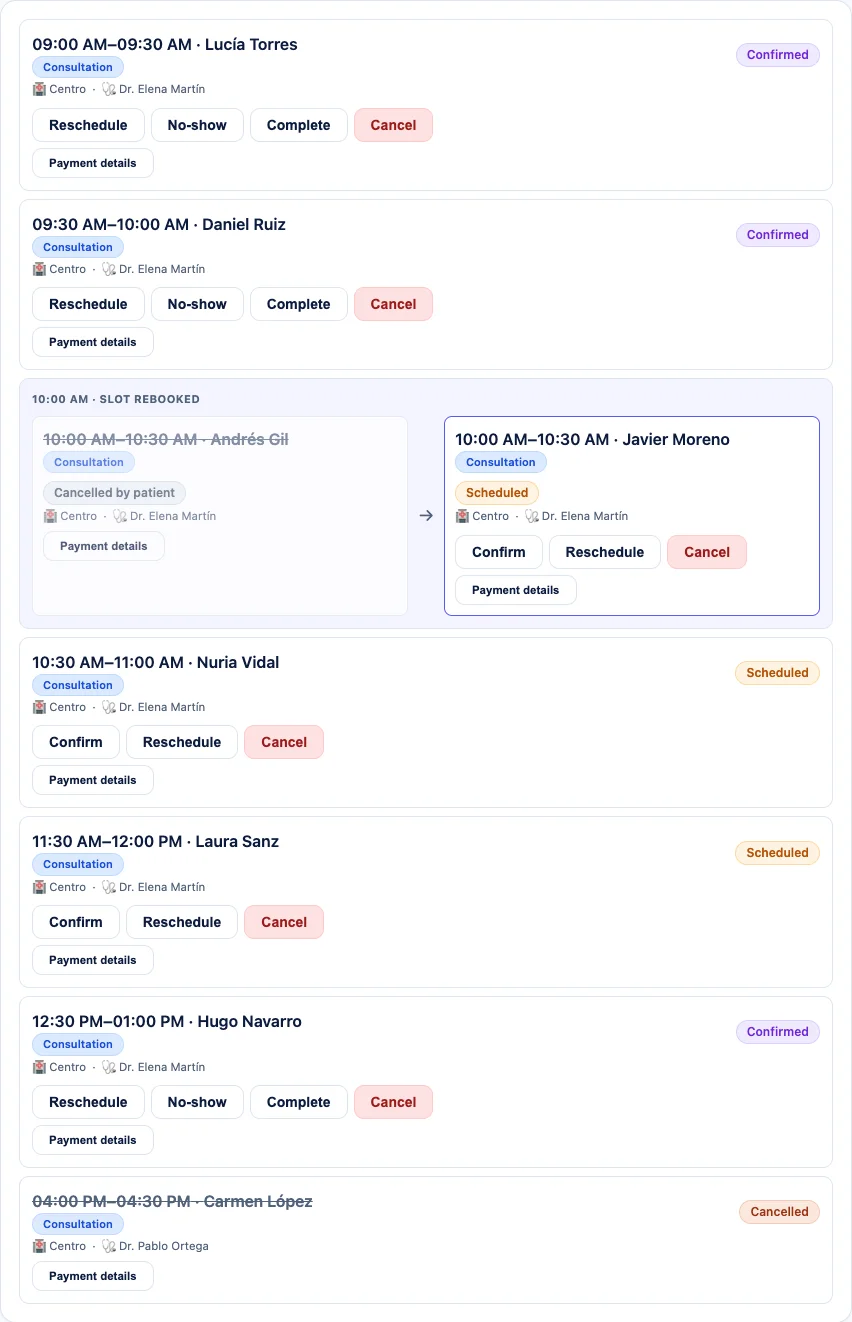
The day view after changes: a patient cancellation whose time was booked again, and a clinic cancellation from the doctor’s absence (web app, shown in English). Fictional data.
A cancelled appointment, a free time and a new booking are three different things
On the schedule these three states are kept apart, so reception never mistakes one for another.
- The cancelled appointment: stays visible on the day view, struck through, with who cancelled it
- The free time: the cancelled appointment’s time is offered to new bookings again — in WhatsApp, on the public booking page and to staff
- A new booking: exists only once someone books that time; then the day view shows it beside the cancelled appointment
- Morasel does not contact other patients by itself to fill a freed time. Waitlist offers do that once the clinic sets a waitlist size, on every clinic plan
Limits, permissions and edge cases
What the patient and your team can change today, and what happens in the cases that need a person.
- Patients can confirm, reschedule or cancel only upcoming appointments that are still active
- No minimum notice is currently enforced: a patient can cancel up to the appointment time. Your clinic can tell patients its policy, but the product does not block a late cancellation
- A patient reschedule keeps the same doctor and length. To change doctor, branch or length, staff reschedule the appointment or book a new one
- By default, reception with the agent role confirms and cancels appointments, on the web app and in the iPhone and Android apps, and owners and admins also reschedule them; an owner or admin can switch reception’s booking off for one person. Staff reschedules are checked against the doctor’s availability. Completed, no-show and cancelled appointments cannot be rescheduled
- When staff reschedule or cancel an appointment, the patient is not messaged automatically: reception tells them, and the reminder follows the new time
- A reminder that was already sent stays in the conversation; after a reschedule the patient gets a new reminder for the new time — scheduled for 24 hours before, or as soon as possible when the new time is closer than that, as long as the visit has not started
What this does not do
Morasel does not charge cancellation or no-show fees. If your clinic takes payment at booking — a separate option, switched on per clinic — and the clinic cancels a paid appointment, Morasel records a credit the patient can use to rebook with you; refunds of money stay with your own payment provider and policy.
Let patients change appointments without a phone call
Start free, connect your clinic’s WhatsApp number and see how a change moves through your schedule.
Questions about rescheduling and cancelling
Which software lets patients change an appointment and updates the clinic’s calendar?
Morasel does this on WhatsApp. The patient taps Reschedule on their reminder (or opens My appointments), picks one of the same doctor’s free days and times, and the same appointment moves on the clinic’s schedule. Staff see the change on the web and in the iOS and Android apps.
When does a cancelled appointment’s time become available again?
As soon as the cancellation goes through. No minimum notice is currently enforced. The cancelled appointment stays on the day view, struck through.
Can the clinic require a minimum notice to cancel?
Morasel does not currently enforce a minimum notice. Your clinic can explain its policy to patients and discuss late cancellations in the same WhatsApp conversation, but that policy does not block a cancellation in the product.
What happens to the other appointments in a recurring series?
Nothing. Each visit in a series is its own appointment, so a patient who reschedules or cancels one visit changes only that one.
Is the patient told when staff move or cancel an appointment?
Not automatically. Reception tells the patient, for example from the shared inbox, and the reminder is rescheduled for the new time. When a whole period is cancelled because the doctor is away, recording the absence can message the affected patients for you.
Does Morasel fill a cancelled time automatically?
No. The time becomes bookable again for everyone. Offering it to waiting patients is the waitlist feature, on every clinic plan once the clinic sets a waitlist size.
Can reception book the earliest dermatologist across branches from a WhatsApp chat?
Yes. In Morasel, reception clicks Book appointment in the patient's WhatsApp chat (or on the patient's profile or in the clinic tab), picks Dermatology and keeps Any doctor, earliest first: Morasel lists the earliest free times across every dermatologist and every branch, the same times the WhatsApp booking assistant offers. One click fills in the branch, doctor and time, and the patient gets one WhatsApp confirmation. Reception, admins and owners can do this on every Morasel Clinics plan that includes scheduling, on the web and in the iPhone and Android apps.
Can reception reschedule or cancel a visit from the WhatsApp chat?
Yes. A visit booked from the chat leaves a card in the conversation that only your team sees, showing the visit's current status. Reschedule opens the booking panel at the date and time for that visit (a staff reschedule does not message the patient automatically), and Cancel visit cancels it after you confirm. Reception, admins and owners can do both, on the web and in the iPhone and Android apps; an owner or admin can switch booking off for one person.