
Patient communication software for clinic reception: one shared WhatsApp inbox
In Morasel, every WhatsApp conversation with your clinic’s number lands in one shared inbox that the whole reception team works from, on the web and in the iOS and Android apps. Staff assign a conversation, leave internal notes, hand it over with a note to a colleague, and book or move the patient’s appointment on the same schedule.
WhatsApp booking is on for every clinic as soon as its WhatsApp number is connected.
How can several receptionists manage patient conversations and appointments together?
By working from one shared inbox instead of personal phones, and by making ownership visible. In Morasel, a conversation is either unassigned or assigned to one person; whoever picks it up can see the whole WhatsApp history, write internal notes that the patient never sees, and forward it to a colleague with a short handover note. The patient keeps writing to the same clinic number throughout.
Appointments live on the clinic’s schedule — Today and the scheduling pages — not inside the conversation. Reception books, confirms or moves an appointment there, and the patient’s automated messages (the booking confirmation from staff bookings and the 24-hour reminder) appear in the same WhatsApp conversation, so the next person to open it sees what the patient received.
From a first message to a moved appointment
Clínica Aurora has two receptionists, Sara and Omar, both with the Admin role. The patient is Laura. All names are fictional.
| Step | What reception does in Morasel | What Laura sees on WhatsApp |
|---|---|---|
| 1. Enquiry | Laura’s message arrives in the shared inbox under Unassigned, visible to the whole team. | She writes to the clinic’s usual WhatsApp number: “Do you have anything with Dr. Martín next week?” |
| 2. Ownership | Sara opens the conversation and assigns it to herself; it moves to her Assigned to me queue, so nobody else answers in parallel. | One reply, from the clinic. |
| 3. Booking | Sara books Thursday at 10:00 with Dr. Martín on the schedule. The appointment shows as Scheduled. | She receives the booking confirmation message with the date and time, in the same conversation. |
| 4. Handover | At the end of her shift Sara uses Forward to a teammate: Omar, with the note “Booked Thu 10:00 with Dr. Martín. Asked about parking — answered.” Omar is notified; the note stays as an internal note. | Nothing: internal notes are never sent to the patient. |
| 5. Change request | Next day Laura writes again. Omar sees the whole thread and Sara’s note, moves the appointment to 11:30 on the schedule and replies with the new time. Staff changes do not message the patient automatically. | “Could I come a bit later on Thursday?” — then Omar’s reply with the new time. |
| 6. Result | The appointment shows Thursday 11:30, still Scheduled, and its reminder now follows the new time. The conversation is assigned to Omar and can be marked Solved. | The reminder arrives about 24 hours before 11:30, with Confirm, Reschedule and Cancel. |
This example follows the team after Laura chose “💬 Talk to the clinic”, which hands the chat to your team and alerts staff during working hours. Before that, the clinic’s WhatsApp assistant answers first, and Laura can book, confirm or move appointments on her own.
These taps are answered by Morasel's WhatsApp booking assistant, which is on for every clinic as soon as its WhatsApp number is connected.
What the team sees
Real screenshots from a Morasel workspace filled with fictional data. The app is in English (and Arabic).
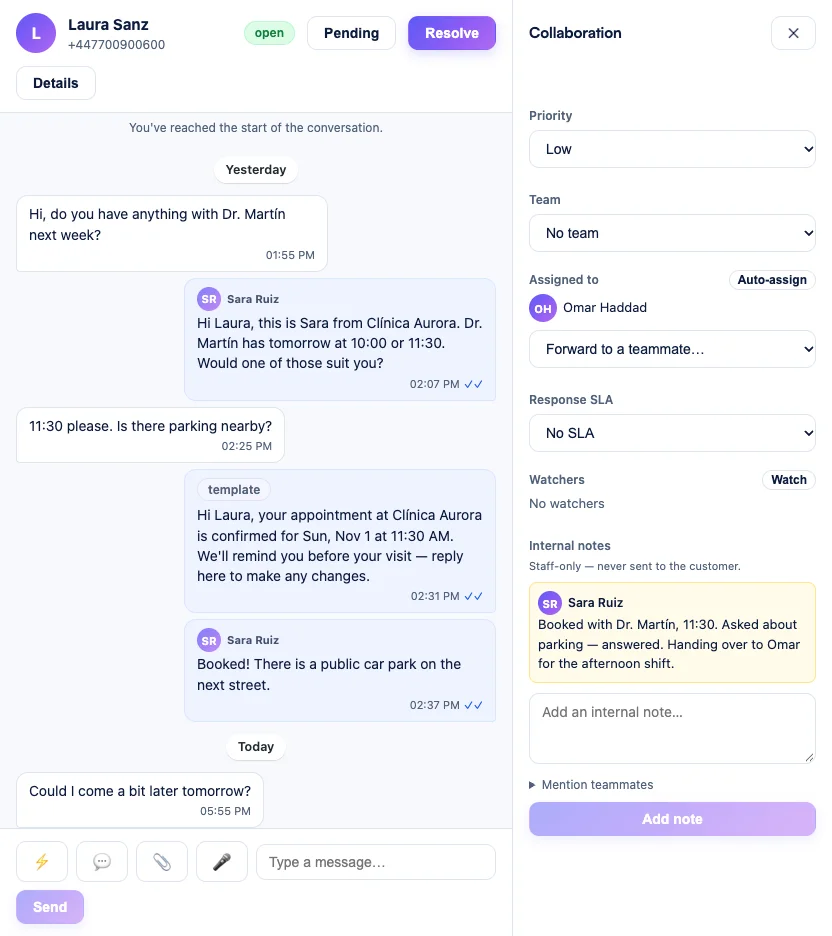
A handover in the shared inbox: the full conversation, who owns it now and the staff-only note (web app, shown in English). Fictional data.
Which information is where
So reception knows where to look — and what is not there.
| Where | What staff see | What it does not hold |
|---|---|---|
| The conversation (shared inbox) | Every WhatsApp message with the patient, including the automated booking confirmation, the reminder and the assistant’s replies, with sent, delivered and read ticks | Appointment details: those are on the schedule |
| Details panel beside the conversation | Who it is assigned to, priority, team, watchers and internal notes with @mentions | Anything the patient can see — it is staff-only |
| Patient panel beside the conversation | The person's upcoming and past visits with their status, staff-only notes, and Book for that person | Charting, diagnoses, results or prescriptions |
| Today and the schedule | Each appointment’s time, patient, doctor, branch, service and status, with Confirm, Reschedule and Cancel | The conversation itself |
| The patient’s contact | Name, WhatsApp number and whether the patient has asked to stop messages | A clinical record: Morasel has no charting, diagnoses, results or prescriptions |
Who can do what
Morasel has fixed roles. What reception can do depends on the role each person is given; for the Agent role, an owner or admin can also switch booking off for one person.
| Action | Owner and Admin | Agent |
|---|---|---|
| Read and reply to patient conversations | Yes | Yes |
| Internal notes, @mentions and watching a conversation | Yes | Yes |
| Assign a conversation, or forward it with a handover note | Yes | No |
| See appointments on Today and the schedule | Yes | Yes |
| Book, confirm, reschedule or cancel an appointment, and check a patient in | Yes | Yes, unless an owner or admin switches it off for that person |
| Mark a patient as opted out of messages | Yes | No |
Assigning and forwarding conversations need the Admin or Owner role, which is why Sara and Omar have it in this example. Reception's booking works on the web app and in the iPhone and Android apps. Owners also manage billing and workspace settings.
On the web and on the phone
The shared inbox, the Details panel with assignment, notes and forwarding, and the schedule actions are in the web app and in the iOS and Android apps, so the person at the desk and the person on the move see the same conversation.
- Web: inbox queues All conversations, Assigned to me, Unassigned and Solved
- iOS and Android: the same conversations, with assignment, forwarding and internal notes
- Push and in-app notifications when a conversation is assigned or forwarded to you
- A WhatsApp number connected once for the whole team — no personal phones
What this is not
Morasel organises the people who answer patients; it does not replace them.
- Not an automatic receptionist: conversations that need a person stay with your team
- WhatsApp conversations only — no phone-call log or call recording
- Not an electronic health record: no charting, diagnoses, results or prescriptions
- No automatic follow-up when a patient goes quiet; reception decides
Team size and price
Clinic plans start at $49/month and include 3 users on Core, 8 on Pro and 15 on Max, with a 14-day free trial and no card.
- Every paid plan includes the shared inbox, notes, assignment and the schedule
- WhatsApp messages are charged separately from a prepaid message balance
- Message rates follow Meta’s official prices plus a Morasel service fee
Related pages
Morasel vs the WhatsApp Business app
When a clinic’s WhatsApp Business app setup stops being enough.
Patient appointment reminders
The 24-hour reminder and how a patient confirms.
Reschedule and cancel on WhatsApp
What happens when an appointment changes, and what staff see.
Recurring appointments
Book a patient's repeat visits in one go, each with its own reminder.
The shared inbox
Morasel’s team inbox for every kind of business.
Morasel’s scope
Morasel handles scheduling and patient communication. Morasel is not an electronic health record: it has no charting, diagnoses, results or prescriptions. Use it alongside the record system your clinic already has. Staff can keep short notes about a patient that the patient never sees and AI never reads.
Morasel is a communication and scheduling platform. It is not a medical device, does not provide medical advice or diagnosis, and makes no HIPAA-compliance claim. Clinics remain responsible for how they collect consent and handle patient information under the laws that apply to them.
Questions about reception and the shared inbox
How can several receptionists manage patient conversations together?
In Morasel, every WhatsApp conversation with the clinic’s number arrives in one shared inbox. A staff member assigns it, writes internal notes the patient never sees, and can forward it to a colleague with a handover note. Appointments are booked and moved on the shared schedule.
Can two people answer the same WhatsApp number?
Yes. The whole team works from the shared inbox on the web and in the iOS and Android apps, on the clinic’s connected WhatsApp number.
How do handovers work?
Use Forward to a teammate in the conversation’s Details panel and add a note. The conversation is assigned to your colleague, the note is saved as an internal note, and they are notified.
What can a receptionist with the Agent role do?
Read and reply to conversations, add internal notes and @mentions, see appointments, and book, confirm, reschedule or cancel appointments and check patients in; an owner or admin can switch booking off for one person. Assigning or forwarding conversations needs the Admin or Owner role.
Is this an EHR or an automatic receptionist?
Neither. Morasel is not an electronic health record: it has no charting, diagnoses, results or prescriptions. Conversations that need a person are answered by your team.
How much does it cost?
Clinic plans start at $49/month, with a 14-day free trial and no card. WhatsApp messages are charged separately from a prepaid balance.
Can reception see a patient's past visits and staff notes from the WhatsApp chat?
Yes. Beside each WhatsApp chat, the Patient panel shows the person's next visit and past visits with their status (Attended, No-show, Cancelled), five at a time, plus the staff notes about them and a button to book for that person. When a parent and child share one number, staff switch between them. Every clinic staff member can write notes; the author or an admin can edit or delete one. The patient never sees notes and AI never reads them. It is on every Morasel Clinics plan that includes scheduling, on the web and in the iPhone and Android apps.
Can reception book the earliest dermatologist across branches from a WhatsApp chat?
Yes. In Morasel, reception clicks Book appointment in the patient's WhatsApp chat (or on the patient's profile or in the clinic tab), picks Dermatology and keeps Any doctor, earliest first: Morasel lists the earliest free times across every dermatologist and every branch, the same times the WhatsApp booking assistant offers. One click fills in the branch, doctor and time, and the patient gets one WhatsApp confirmation. Reception, admins and owners can do this on every Morasel Clinics plan that includes scheduling, on the web and in the iPhone and Android apps.
Can clinic staff fix a patient's name when WhatsApp shows a nickname or only a number?
Yes. In Morasel, anyone on the clinic team who can reply to chats clicks ✎ next to the name at the top of the patient's WhatsApp chat, or Edit name on the patient's profile, and types the real name. The inbox, the schedule, reminders and reports show it straight away, and a later WhatsApp message never changes it back. It is on every Morasel Clinics plan, on the web app and in the iPhone and Android apps.
Can a clinic export the day's patient list to Excel?
Yes. On the clinic tab's Today, Export downloads the selected day as an Excel file (.xlsx): time, queue number, patient, phone, doctor, service, branch and status for each visit, in the clinic's time zone and in English or Arabic (an Arabic file reads right to left). Staff notes are never exported. Owners, admins and reception can export, on every Morasel Clinics plan that includes scheduling, on the web app and in the iPhone and Android apps; on a phone, Export opens the share sheet.
Can reception open a patient's profile from the day's schedule?
Yes. A patient's name in Today, the queue, the waitlist, payments and repeat visits opens the patient's profile, with their visits and details, for staff who can see patients. A visit booked for a child opens the profile of the parent who owns the WhatsApp number. It works on the web app and in the iPhone and Android apps; on a phone, the walk-in waiting list shows numbers only.
A parent booked a visit for their child under their own name. Can the clinic move the visit to the child without cancelling it?
Yes. In Morasel, Change patient on the visit opens "This visit is for someone else": pick the child from the people on that WhatsApp number, or add them by name, and save. The visit and its reminders move to the child on the same number, with the same time, doctor and service, and nothing is sent to the patient. Owners, admins and reception can do it. It works on the web app and in the iPhone and Android apps.
Bring reception onto one WhatsApp inbox
14-day free trial, no card. Connect your clinic’s WhatsApp number, invite your team and assign your first conversation.