
Business knowledge for stores: what your assistant knows
Customers ask your WhatsApp assistant the same store questions all day: where is your showroom, how much is delivery to my area, can I return this, do you make custom sizes. Business knowledge is the one place where you answer them. Each answer is a card that the owner or an admin approves. When a customer asks one of these questions, the assistant replies from the approved card only, in Morasel's own fixed wording with your answer inside it, and never invents anything. An answer that is missing, not approved or out of date is never sent. Business knowledge for stores is available on the web. Morasel switches the assistant's use of your answers on with your store; until then the page says so and the assistant works as before.
Open this page in the app https://app.morasel.ai/settings/knowledge
What the assistant does: when a customer's whole message is one of these store questions, it answers from your approved card in Morasel's fixed wording, with your answer and your optional note inserted as written. If the customer names a place that none of your delivery zones covers, it says where you deliver and that a team member will confirm the place. Questions about the customer's own order, about a product, a photo or a voice note, or a problem the customer reports keep their own routes: the assistant handles them as it did before. An answer that is missing, rejected or not approved is never sent. An answer past its review date is still sent for 30 days, then stops until you confirm or edit it.
Damaged or wrong items always reach a person. When a customer reports one, the assistant sends your approved policy (how long they have to report it, what to send and what you do) and hands the chat to your team. A custom-size quote, an invoice to issue and a call-back request also end with a person.
Who can do what: owners and admins approve answers and import your Shopify policies. Team members who work the inbox can edit an answer too: their change goes to the owner as a suggestion (Sent to the owner for approval) and is not used until the owner or an admin approves it. Order agents and drivers don't see Business knowledge.
Linked cards: the showroom address and map pin, the showroom hours and your delivery days come from where you already set them. Their cards say Linked and take you there to edit them (Edit the address, Edit the hours, Edit delivery days).
Other questions: anything no card covers goes in Other questions, in your own words in Arabic and English. The custom entries already in your assistant's menu appear there as approved answers, and you keep editing them on the Knowledge base page: the assistant uses the entry's current text, and an entry you switch off or delete is no longer used.
Your Shopify policies: the import reads only your published refund, shipping and contact policies, by fixed rules, with no AI. It drafts a card only from a plain, general sentence, such as how many days a customer has to return an item or who pays return shipping; a sentence with a condition or an exception is left for you to answer. It fills only cards that have no answer yet. Where a card already has a different answer, even one you rejected, the card stays as it is and the import adds a suggestion instead. Once you edit a drafted card, its label reads Edited from your Shopify policy.
The permission it needs: Morasel reads your policies with the Shopify permission read_legal_policies. It is optional, and your store works the same without it. If you connected your store with your own Shopify app, add read_legal_policies to the app, release the new version and approve it on the store again. If your store uses the Morasel app in your Shopify admin, open Morasel there, go to Settings and choose Allow store policies.
Review dates (Still right?): every approved answer shows a Review by date. Each card has its own period: 90 days for delivery zones, fees and made-to-order details, 180 days for most policies, and 365 days for contact details and service hours. After the date the card says Stale and the assistant still answers for another 30 days. After that the answer is not used until you click Still right? or edit it.
On your device
Web
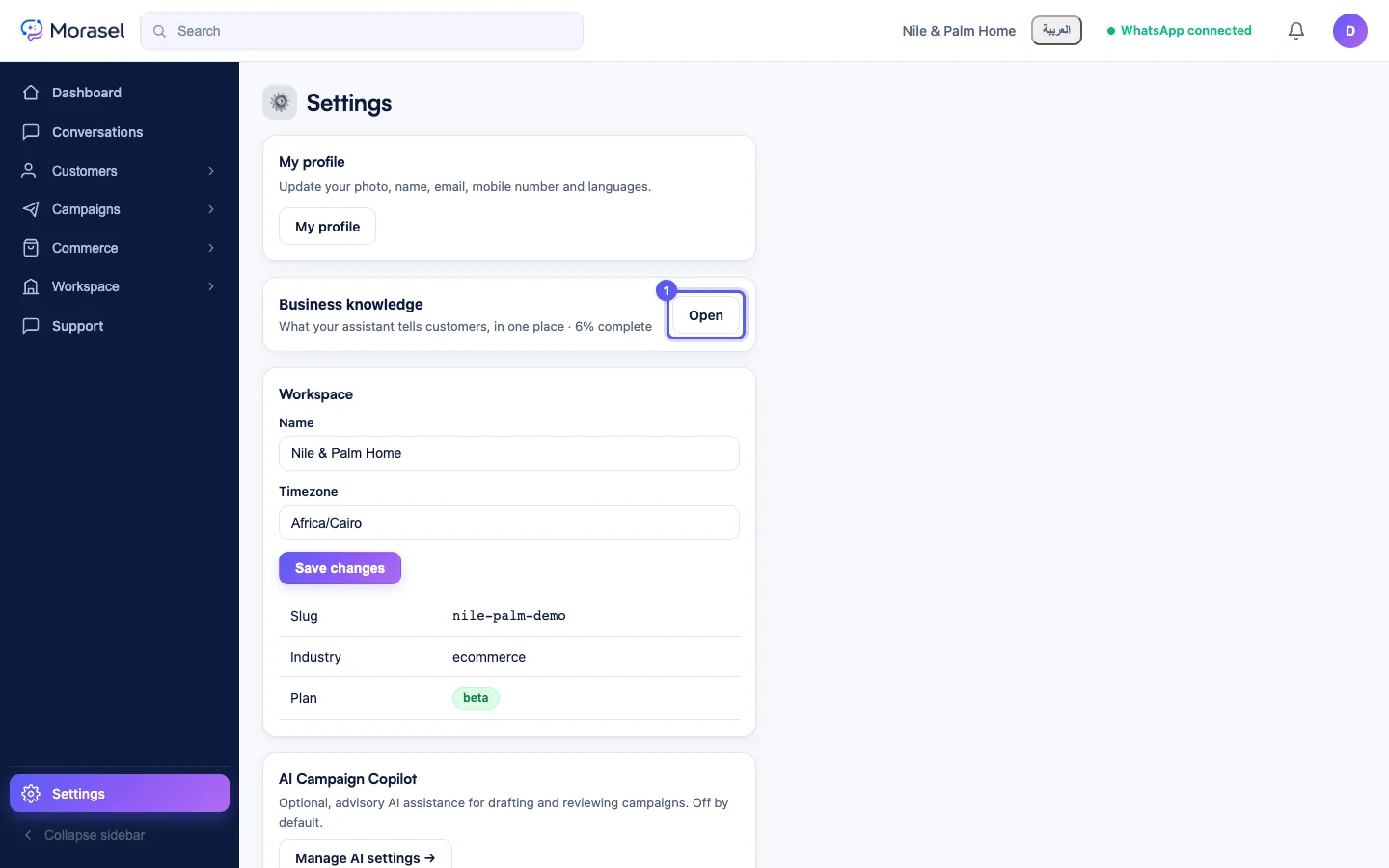
Open Settings and click Open on the Business knowledge card.
What you should see: Business knowledge opens with your store's questions in groups: contact and showroom, hours, ordering, delivery, how customers pay, returns, exchanges and damaged items, custom sizes and made to order, products, invoices, and Other questions. The card on Settings shows how complete it is.
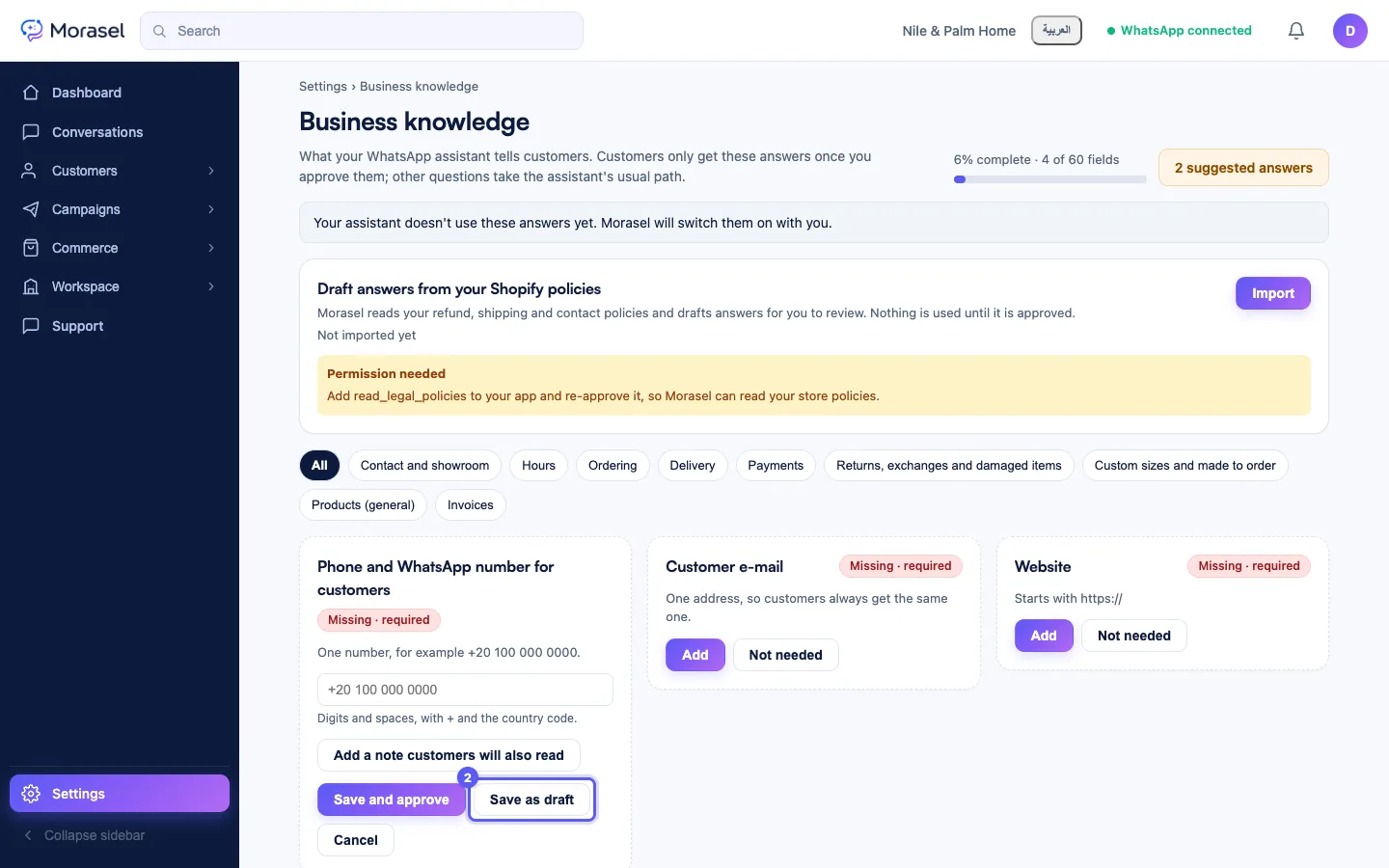
Answer a card and click Save as draft, or Save and approve if you are the owner or an admin.
What you should see: The card shows its status (Approved, Drafted, Missing, Stale or Linked) and, under What customers will read, the exact words the assistant will send. Delivery zones is a table: for each zone, the areas it covers, the fee (or shown at checkout) and the delivery time. If a question doesn't apply to your store, click Not needed. On a yes/no question, such as installation or exchanges, customers are told you don't offer it; on any other card, the assistant doesn't answer it from Business knowledge and handles the question as before.
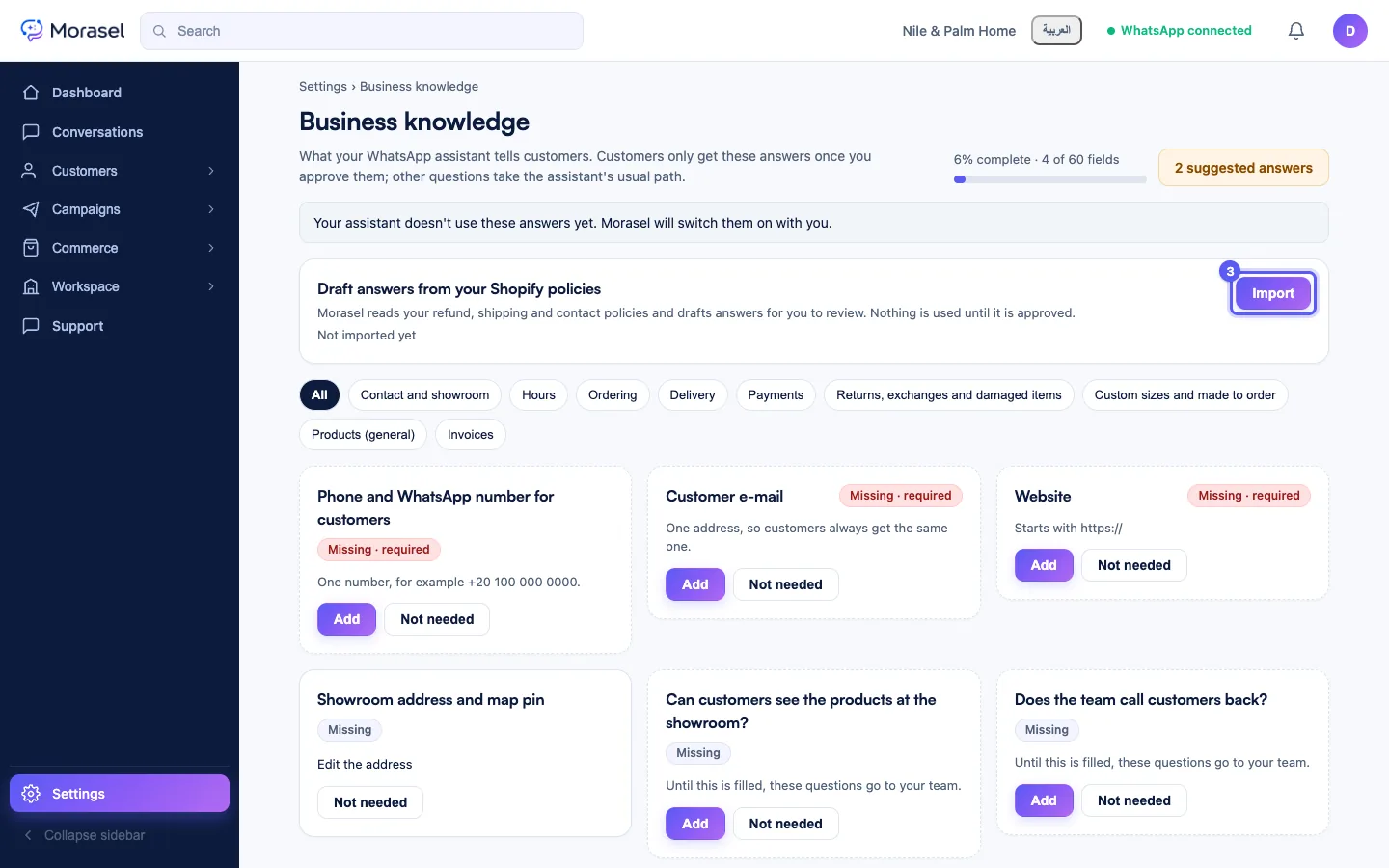
To start from your Shopify policies, click Import on Draft answers from your Shopify policies. Owners and admins can import.
What you should see: Morasel reads your published refund, shipping and contact policies and drafts only what they state plainly. A line says how many answers were Drafted, Suggested and Skipped. A drafted card is labelled Your Shopify policy and shows the sentence it came from. Check it, edit it if you need to, and click Approve: nothing from your policies is used before that.
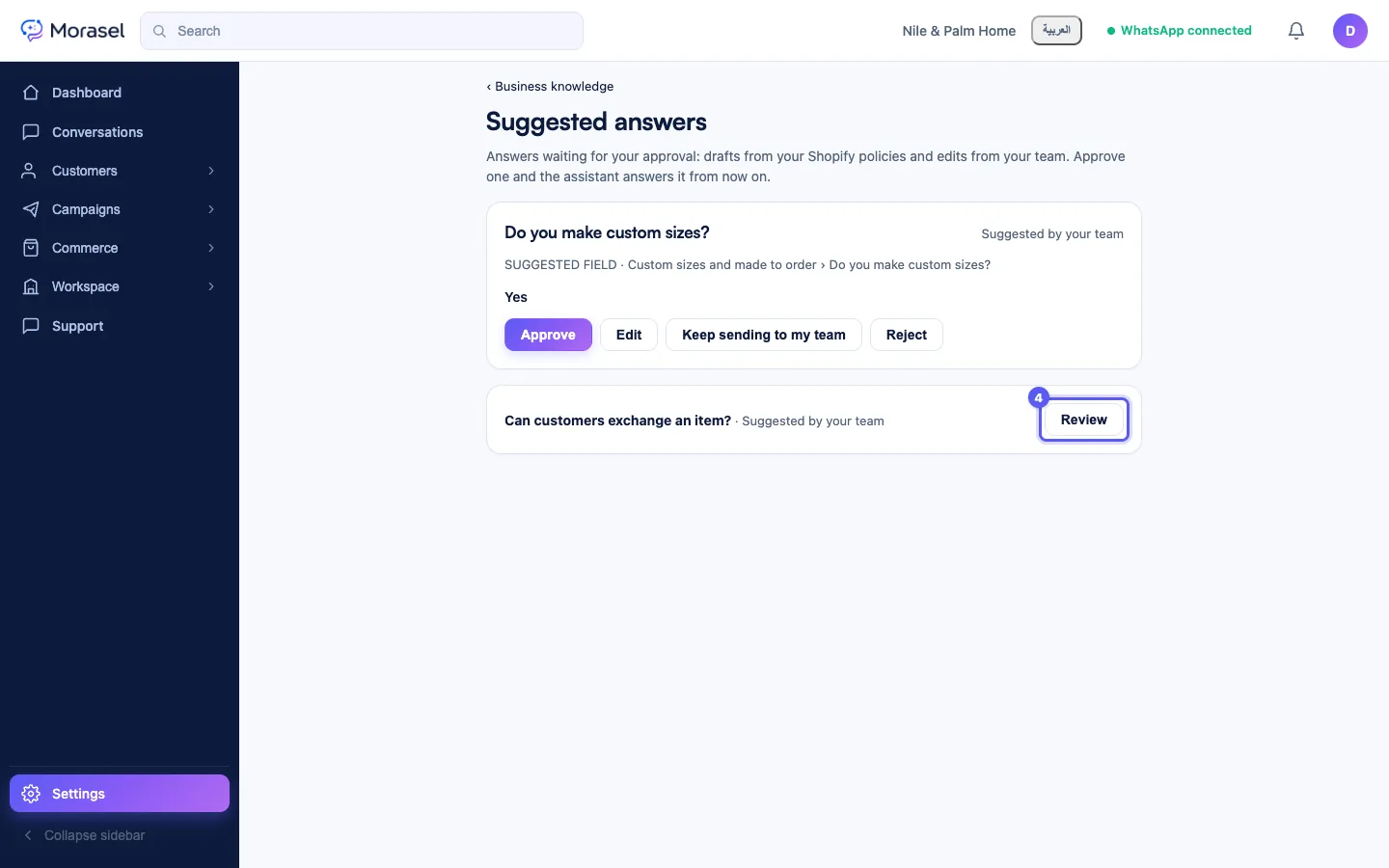
When there are suggestions, click the link that shows how many suggested answers are waiting (for example, 2 suggested answers), then click Review on a suggestion.
What you should see: Suggested answers opens. You see what was suggested and the card it belongs to: a change a team member wrote, or a sentence from your Shopify policy that differs from your current answer. Approve it and the assistant uses it from then on, Reject it, or choose Keep sending to my team.


If it didn't work
- I don't see Business knowledge in Settings.
- It appears in Settings of every online store workspace, for team members who work the inbox.
- The page says my assistant doesn't use these answers yet.
- If the page says so, that is expected: you can write, import and approve answers today, and your WhatsApp assistant starts using them when Morasel switches them on with you. Until then it answers customers as before.
- Nothing is answered on WhatsApp.
- Your store's WhatsApp assistant must be switched on: Business knowledge only answers inside it. Ask Morasel support to check that it is on for your store.
- I saved an answer but the assistant doesn't use it.
- A drafted answer is not used. Open the card and click Approve (or Save and approve). Missing, Rejected and Expired cards aren't used either.
- Import says a permission is needed.
- Morasel needs read_legal_policies. On your own Shopify app, add it, release the new version and approve it on the store. On the Morasel app, open Morasel in your Shopify admin, go to Settings and choose Allow store policies. Then click Import again.
- Import says to reconnect my store with the Morasel app.
- A store connected the older way can't be given the new permission. Reconnect the store with the Morasel app, then click Import.
- Import says Nothing new in your Shopify policies.
- Every answer it could read is already on your cards, or your policies don't state the rest plainly enough to draft. Answer those cards yourself.
Frequently asked questions
What is Business knowledge for stores in Morasel?
A page in an online store's Settings where the owner or an admin answers what customers ask (showroom, hours, ordering, delivery zones with fees and times, how customers pay, returns, exchanges, damaged items, custom sizes, products and invoices) and approves each answer. The WhatsApp assistant answers these questions only from approved answers, in Morasel's fixed wording.
Will the assistant make up answers?
No. It uses Morasel's fixed wording with your approved answer inside it, plus your note word for word. An answer that is missing, not approved or out of date is never sent.
Does Morasel use my Shopify policies without asking me?
No. Morasel reads them only when the owner or an admin clicks Import, and only turns them into drafts. You check and edit each one, and nothing is used until it is approved.
What happens when a customer says an item arrived damaged?
The chat always goes to a person. If you approved your damaged-item policy, the assistant sends it first: how long the customer has to report it, what to send and what you do.
Do order and product questions change?
No. Questions about the customer's own order, about a product, or a problem the customer reports keep their own routes. Business knowledge covers general store questions.
Is it available on the phone apps?
Not yet. Business knowledge for stores is available on the web.
What happens to the questions the assistant couldn't answer?
They are listed under Questions we couldn't answer on Settings → Business knowledge → Suggestions, most asked first, with personal details hidden. Click Add answer to write the answer: the question leaves the list (a team member's answer is saved as a draft for an owner or admin to approve). Approving an answer to the same question also clears it. Owners and admins can click Dismiss to remove a question, there or on Care → Assistant.
Last updated · Added: answer or dismiss the questions the assistant couldn't answer