
Shopify delivery with your own drivers
Included in Morasel Commerce Pro and Max. Assign orders to your drivers, follow every delivery on the Today board, send drivers to the exact spot the customer shared on WhatsApp, and confirm each driver's cash at the end of the day.
How can a Shopify store run its delivery team from WhatsApp?
In Morasel, your drivers are members of your team with the Driver role. Staff give them orders from Shopify, one at a time or up to 50 at once; each driver gets a push notification in the Morasel app and, if they opted in, a WhatsApp offer to accept. Drivers record Picked up, Delivered with the cash collected, or Couldn't deliver with a reason, and your team sees it on the order straight away.
Today shows how the day is going, Reconciliation shows which driver is ready to hand over cash, and a location the customer sends on WhatsApp can become the pin the driver navigates to. When a driver marks an order Delivered, Morasel can mark those items fulfilled in Shopify.
From Shopify order to cash in hand
| Part | What it does |
|---|---|
| Assign delivery | Turn on the Assign delivery automation once (owner or admin). Then give a driver one order, or select up to 50 in Orders. Orders a courier delivers are skipped. |
| Driver app | Drivers use a driver-only view of the Morasel iOS and Android app: My deliveries, Accept, Picked up, Next stop, Delivered or Couldn't deliver, and Navigate. They sign in with WhatsApp and see only their own deliveries. |
| Delivery location | Put the exact spot on the order: a location the customer shared in the chat, a Google Maps, Apple Maps or Waze link, a dropped pin or a typed address. The driver navigates there; a location the customer shares later never replaces the one your team chose. |
| Today board | A ring shows today's deliveries: Delivered, On the road, Waiting pickup and Failed. To assign and Problems show what needs you, and Drivers today shows each driver's progress. Every number opens the deliveries behind it. |
| Reconciliation | Each driver reads On the road, Ready to hand over, Handed over, Confirmed or Mismatch. Pick a day, check the cash counted and confirm it. |
| Order timeline | Each step is on the order, including who assigned it: “Nour Hamed assigned delivery 1 to Karim Hassan · 3 items”. |
| Order agent role | A team role for the person who runs deliveries: Orders, Today and Reconciliation, deliveries and returns, but no inbox. |
| Shopify fulfilment | When a driver marks a delivery Delivered, Morasel marks that delivery's items fulfilled in Shopify, once the store grants the fulfilment permission (write_merchant_managed_fulfillment_orders). |
What it looks like in Morasel
Real screenshots of the web app from a demo store with fictional data. The app is shown in English.
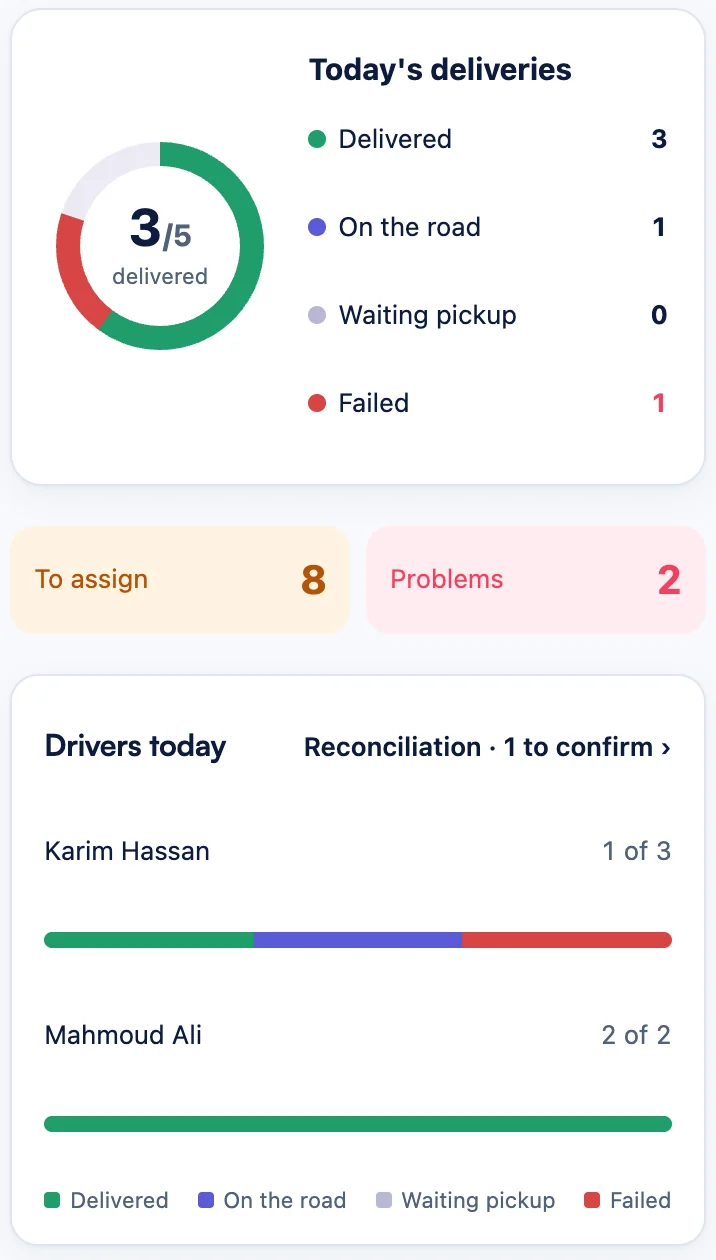
Today: delivery progress, what needs you and each driver's day (web app, shown in English). Fictional data. 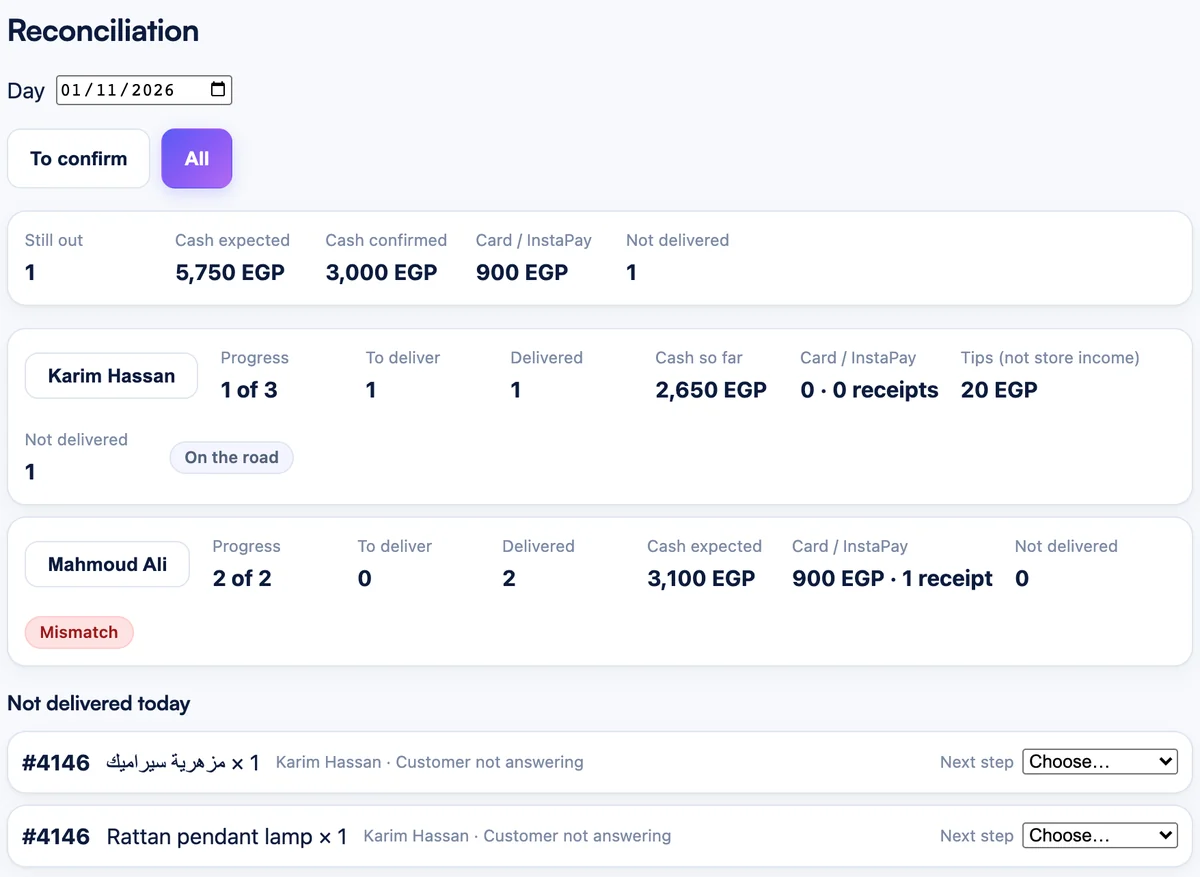
Reconciliation: each driver's stage and cash for the day (web app, shown in English). Fictional data. 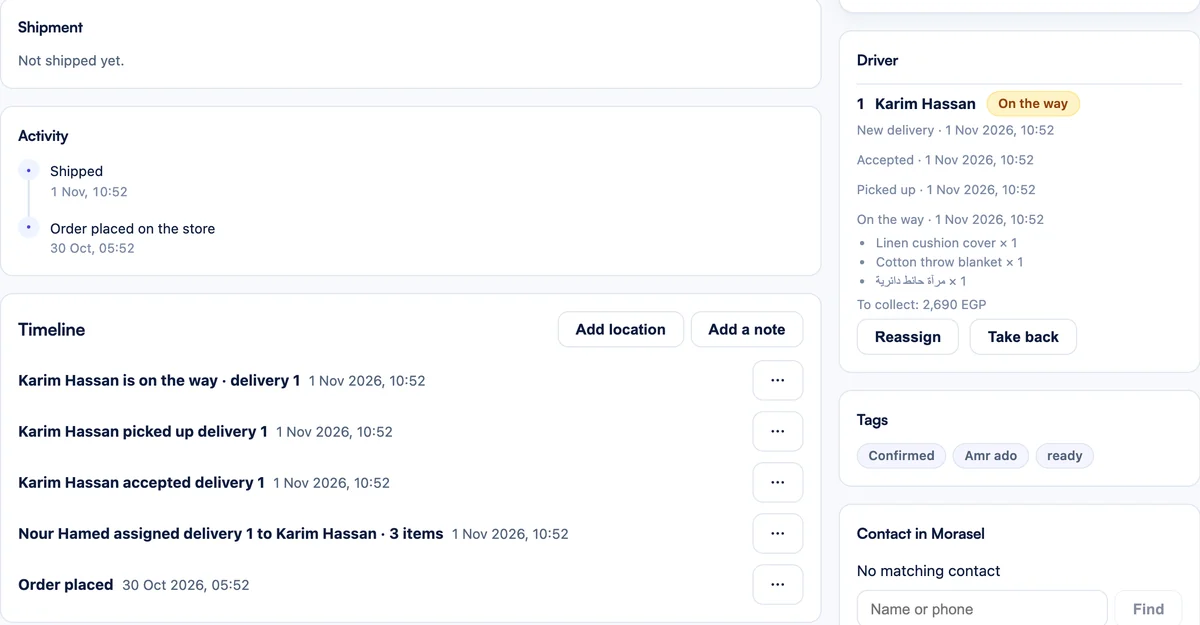
The order: who assigned the delivery and every step the driver took (web app, shown in English). Fictional data. 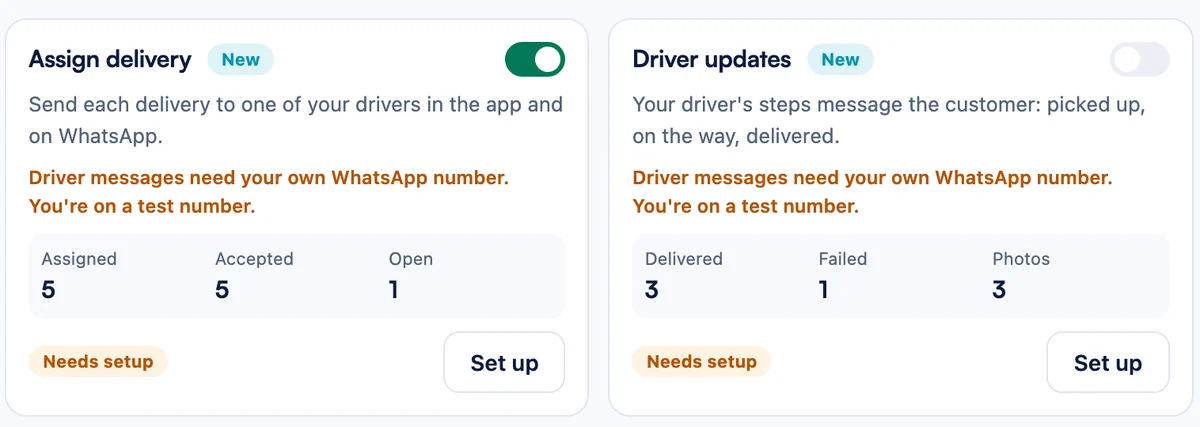
The Assign delivery setup step, and the reason shown on a test WhatsApp number (web app, shown in English). Fictional data.
One delivery day at Nile & Palm Home
An online home-goods store with two drivers, Karim and Mahmoud, and Nour, who runs deliveries as an order agent. Everyone here is fictional.
| Step | In Morasel | Result |
|---|---|---|
| 1. Set up once | The owner turns on Assign delivery in Commerce → Automations and adds Karim and Mahmoud by phone in Team & Access. | The card reads On. Drivers sign in to the Morasel app with WhatsApp. |
| 2. Pin the address | Mona, a customer, sends her location on WhatsApp. An agent adds it to her order's timeline as the delivery location. | The order shows “Delivery location set”; the address and pin stay hidden until someone clicks Show. |
| 3. Assign | In Orders, Nour selects this morning's orders and assigns them to Karim. | Karim gets a push, then a WhatsApp offer with Accept. The timeline reads “Nour Hamed assigned delivery 1 to Karim Hassan · 3 items”. |
| 4. On the road | Karim taps Accept, Picked up, then Navigate on Mona's order. | Navigate opens the pin in Apple Maps or Google Maps. On Today, the delivery moves from Waiting pickup to On the road. |
| 5. Delivered | At the door Karim taps Delivered, confirms the cash collected and adds a photo. | The order shows the cash and the photo to your staff, and the items are marked fulfilled in Shopify. |
| 6. A failed stop | Another customer doesn't answer. Karim taps Couldn't deliver and picks “Customer not answering”. | It appears under Problems on Today, for someone to call the customer or reassign it. |
| 7. Close the day | Karim hands over from My day. Nour opens Reconciliation, checks the cash counted and confirms it. | Karim reads Confirmed, or Mismatch if the amounts differ. |
What the driver sees
A short offer to accept, after the push notification in the app.
The product's English wording, with a fictional store, driver and order. Driver messages are sent in English or Arabic, from the store's own WhatsApp number.
A new delivery
Karim accepts the order Nour assigned to him.
Illustrative example — nothing shown here is a real business, person or message.
Who uses what
| Task | Web app | iOS and Android apps |
|---|---|---|
| Assign deliveries and reassign | Yes | Yes |
| Today board and Reconciliation | Yes | Yes |
| Set a delivery location on the order | Yes | Yes |
| Driver: accept, picked up, delivered, navigate, hand over cash | Yes | Yes, in the driver view of the app |
The app is in English and Arabic.


What you need
| Item | Details |
|---|---|
| Availability | Included in Commerce Pro and Max, and during the free trial. Not in Commerce Core. |
| Setup step | Turn on Assign delivery in Commerce → Automations, and add your drivers by phone in Team & Access. |
| WhatsApp number | Driver messages need the store's own WhatsApp number. On a test number, the card says so and nothing is sent to drivers on WhatsApp. |
| Shopify fulfilment | Marking items fulfilled in Shopify needs the write_merchant_managed_fulfillment_orders permission on the store's Shopify app. Until then, the order shows what to add. |
| Roles | Owners, admins, agents and order agents manage deliveries; drivers see only their own. |
What it does not do
Morasel records what your drivers do and shows it to your team. It does not move money or watch drivers.
- No live GPS tracking of drivers
- No route planning
- Morasel never charges the customer and never marks a Shopify order paid; it records the cash the driver confirms
- Orders a courier delivers keep the courier's tracking
- Nothing is reassigned automatically: a declined or unanswered offer goes to Problems
Plans and message costs
Delivery drivers come with Commerce Pro ($99/month) and Max ($199/month), and with the 14-day free trial.
- Push notifications to drivers are free
- Driver messages on WhatsApp are charged from your prepaid balance, at the utility rate outside the free 24-hour window
- Rates follow Meta's prices by country and message type, plus a Morasel service fee
Related pages
Help: locations, drivers and reconciliation
Turn on Assign delivery and set a delivery location, step by step.
Help: Today and reconciliation
What every number counts and how to confirm cash.
Returns from WhatsApp
Start, close and cancel Shopify returns from the chat.
COD confirmation
Confirm cash-on-delivery orders before a driver goes out.
Shipping and tracking
Courier updates on WhatsApp.
Commerce pricing
Plans, users and the free trial.
What counts as consent
Shopify customer data, a phone number, checkout activity, or an order does not by itself provide WhatsApp marketing consent. Morasel sends marketing messages only when a valid opt-in is recorded and always enforces opt-out state.
Delivery driver questions
Can my Shopify store use its drivers instead of a courier?
Yes. Drivers are team members with the Driver role, invited by phone. Staff assign them Shopify orders, and drivers record each step in the Morasel app. Orders a courier delivers keep the courier's tracking. It is included in Commerce Pro and Max.
Do drivers need a separate app?
No. They use the driver view of the Morasel app for iOS and Android and sign in with WhatsApp. They see only their own deliveries: no inbox and no orders list.
How does the driver find the address?
Navigate opens the delivery location set on the order; without one, the location the customer shared during the delivery, then Shopify's map pin, then the shipping address. On iPhone it asks Apple Maps or Google Maps; on Android it opens Google Maps.
How do I check the cash each driver collected?
Open Reconciliation. Each driver shows a stage: On the road, Ready to hand over, Handed over, Confirmed or Mismatch. Pick the day, check the cash counted and confirm it; a different amount is marked Mismatch.
Does Morasel update the order in Shopify?
When the store grants the fulfilment permission, a delivery marked Delivered marks that delivery's items fulfilled in Shopify. Morasel never marks an order paid.
What happens when a delivery fails?
The driver taps Couldn't deliver and picks a reason. The delivery shows under Problems on Today, for your team to call the customer or reassign it. Nothing is cancelled or reassigned automatically.
Can someone run deliveries without seeing customer chats?
Yes. The order agent role has Orders, Today and Reconciliation, deliveries and returns, but no inbox.
Which plans include delivery drivers?
Commerce Pro ($99/month) and Max ($199/month), and the 14-day free trial. Driver messages on WhatsApp are charged from your prepaid balance; push notifications are free.
Bring your drivers into your Shopify orders
Start a 14-day free trial and give your first orders to your drivers.