
Start Shopify returns from the WhatsApp chat
When a customer asks to send something back, your team starts the return in Morasel while it chats. Morasel creates it in Shopify, shows it on the order, and asks about restocking when you close it. Refunds and exchanges stay in Shopify.
Can I create a Shopify return from a WhatsApp conversation?
Yes. In Morasel, an agent opens the customer's order from the chat, picks the items, a reason and an optional note, and taps Start return. Morasel creates the return in Shopify and shows it on the order once Shopify confirms it. The customer gets no message from Morasel: the chat gets a line that only your team sees, and the agent replies in their own words.
When the items are back, staff close the return and choose whether to put them back in stock, or cancel a return that was started by mistake. Orders has an Open return filter, so nothing waits unseen. Refunds, exchanges and shipping labels are still done in Shopify.
Start, close and cancel returns without leaving the chat
Each action is written to Shopify, and the order in Morasel shows the result.
| Action | What happens |
|---|---|
| Start return | From the chat (Customer orders) or from Orders. Morasel asks Shopify which shipped items can still be returned; you choose the items and how many, one of Shopify's reasons and an optional note of up to 255 characters (the reason Other needs one). |
| Return created in Shopify | The order shows “Return open”, with who started it and when. The order's Activity adds “Return #… started by …”, and the chat gets the same line for your team only. |
| Close return | Morasel asks “Put the items back in stock?” every time. “No, just close” is the first choice; “Yes, restock” puts each item back at the location that shipped it. |
| Cancel return | For a return started by mistake. Shopify cancels only a return nothing has been done on yet; otherwise close it instead. |
| Returns the customer asked for in Shopify | Shown on the order as “Return requested”, read-only, with “Review in Shopify”: accept or decline them there. |
| Open returns in Orders | In Filters, “Open return” lists the orders with an open or requested return, each with its badge. |
Morasel shows a return only after Shopify has confirmed it. If Shopify can't be reached, Retry checks Shopify first, so the same return is never created twice.
What it looks like in Morasel
Real screenshots of the web app from a demo store with fictional data. The app is shown in English.
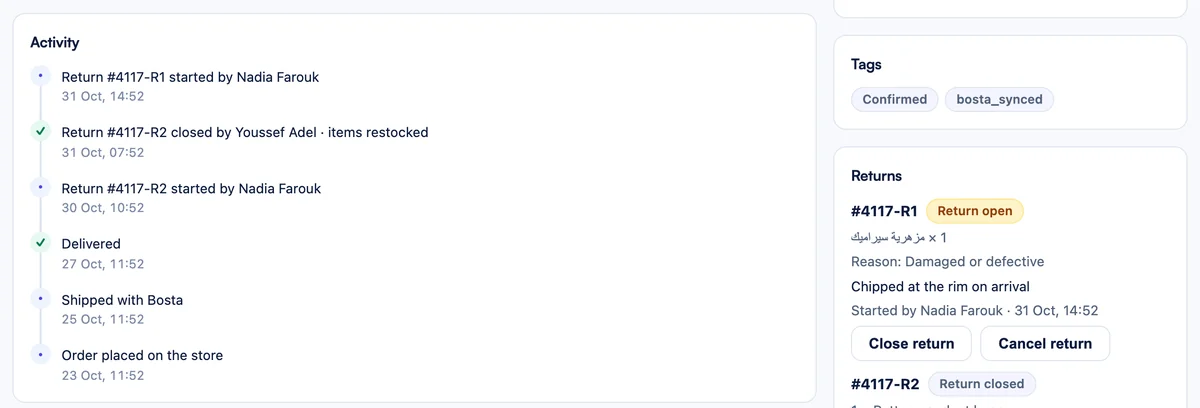
An order with an open and a closed return, and the Activity lines they left (web app, shown in English). Fictional data. 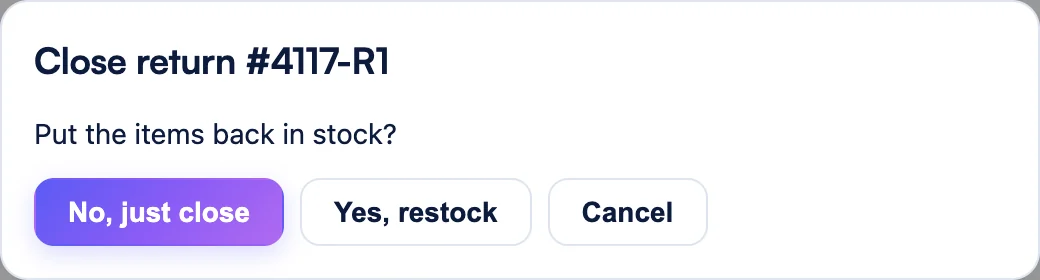
Closing a return: restocking is asked every time (web app, shown in English). Fictional data. 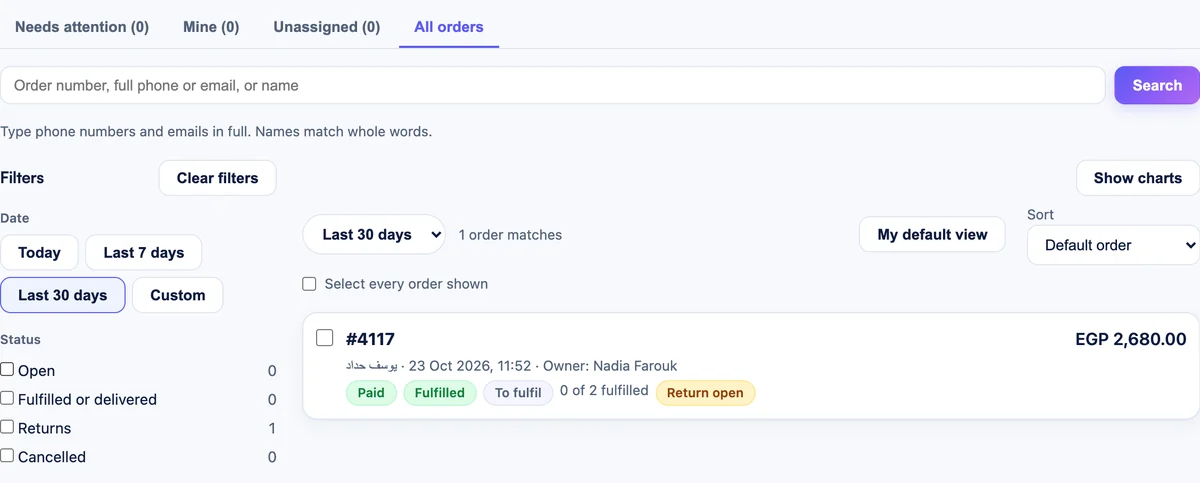
Orders filtered by Open return (web app, shown in English). Fictional data.
One return, from the chat to Shopify
Nile & Palm Home, an online home-goods store, and its customer Salma. The store, the people and the order are fictional.
| Step | In Morasel | Result |
|---|---|---|
| 1. The customer writes | Salma writes on WhatsApp that the ceramic vase from order #4117 arrived chipped. Nadia, an agent, picks up the chat in the shared inbox. | The conversation is in Morasel, next to Salma's orders. |
| 2. Open the order | Nadia clicks Customer orders in the chat and opens #4117. | Start return is shown, because the order has shipped items and Nadia's role can start returns. |
| 3. Start the return | She ticks the vase, quantity 1, chooses “Damaged or defective” and adds the note “Chipped at the rim on arrival”, then clicks Start return. | Shopify creates return #4117-R1. The order shows “Return open” and “Started by Nadia Farouk”; the chat shows “Return #4117-R1 started by Nadia Farouk” to the team only. |
| 4. Reply to the customer | Nadia tells Salma, in her own words, how to send the vase back. | Morasel sends Salma nothing about the return; she reads only what Nadia writes. |
| 5. Find it later | When the parcel arrives, Youssef, an admin, opens Orders, and in Filters ticks “Open return”. | #4117 is listed with its “Return open” badge. |
| 6. Close the return | He clicks Close return. To “Put the items back in stock?” he answers “No, just close”, because the vase is broken. | The return is closed in Shopify and Activity adds “Return #4117-R1 closed by Youssef Adel”. Any refund is then issued in Shopify. |
What the customer sees
Only your team's own words. Starting or closing a return sends the customer nothing.
An illustration with a fictional store and customer. The line “Return #4117-R1 started by …” is not in this thread: it is a note in Morasel that only your team sees.
A damaged item
Salma reports the damage; Nadia starts the return in Morasel and replies herself.
Illustrative example — nothing shown here is a real business, person or message.
Where your team handles returns
| Task | Web app | iOS and Android apps |
|---|---|---|
| Start a return from the chat or the order | Yes | Yes |
| Close with or without restocking, or cancel | Yes | Yes |
| Filter Orders by open return | Yes | Yes |
The app is in English and Arabic. The team-only chat line is written in your workspace's language.


What you need to use it
| Item | Details |
|---|---|
| Plans | Every Morasel Commerce plan. |
| Who can use it | Owners, admins, agents and order agents. Drivers can't. Order agents have no inbox, so they start returns from Orders. |
| Shopify permission | The store's Shopify app must allow returns (write_returns). Until it does, the order says “Ask the store owner to allow returns in Shopify”. |
| Shopify order actions | Shopify actions must be on for your workspace; if they are paused, the return can still be managed in Shopify. |
| Restocking | Morasel restocks each item at the location that shipped it. If Shopify doesn't say where, nothing is restocked and the order tells you so. |
| Mobile apps | In the iOS and Android apps too: open the order, and Start return is in its Returns section. |
What stays in Shopify
Morasel records the return in Shopify and shows it on the order. It does not move money or ship anything.
- No refunds: issue them in Shopify
- No exchanges
- No return shipping labels
- No automatic message to the customer: your team replies in the chat
- Returns customers request in Shopify are reviewed in Shopify
Included in every Commerce plan
Returns from the chat come with Morasel Commerce: Core $49/month, Pro $99/month and Max $199/month, with a 14-day free trial. Starting, closing or cancelling a return sends no WhatsApp message, so it adds nothing to your message costs.
- WhatsApp messages your team sends are charged separately, from a prepaid balance
- Message rates follow Meta's prices by country and message type, plus a Morasel service fee
- Plans and limits are on the Commerce pricing page
Related pages
Help: start a return from a chat
Every step, with screenshots, and what each message means.
Customer's orders beside every chat
Order, payment and delivery state next to the conversation.
Order Management
Change and cancellation requests recorded on the order.
Delivery drivers
Your drivers, the Today board and cash reconciliation.
WhatsApp CRM and leads
Customers who want to buy, from first chat to order.
Commerce pricing
Plans, users and the free trial.
What counts as consent
Shopify customer data, a phone number, checkout activity, or an order does not by itself provide WhatsApp marketing consent. Morasel sends marketing messages only when a valid opt-in is recorded and always enforces opt-out state.
Returns questions
Can I create a Shopify return from a WhatsApp chat?
Yes. Open the customer's order from the chat, choose the items, a reason and an optional note, and click Start return. Morasel creates the return in Shopify and shows it on the order once Shopify confirms it.
Does the customer get a message when I start or close a return?
No. Morasel never messages the customer about a return. The chat gets a line that only your team sees, and the agent tells the customer what happens next in their own words.
Does Morasel refund the customer?
No. Refunds, exchanges and shipping labels stay in Shopify. Morasel creates, closes and cancels the return itself, and shows it on the order.
What happens to stock when I close a return?
Morasel asks “Put the items back in stock?” every time. “No, just close” leaves stock as it is; “Yes, restock” puts each item back in stock at the location that shipped it, in Shopify.
Who can start, close and cancel returns?
Owners, admins, agents and order agents. Drivers can't. Order agents have no inbox, so they start returns from Orders.
What does my store need to set up?
The store's Shopify app needs the returns permission (write_returns), and Shopify actions must be on for your workspace. The Help Center article lists every step, including what to do when Shopify can't tell Morasel where an item shipped from.
Can I handle returns in the iOS and Android apps?
Yes. In the iOS and Android apps, open the order: Start return is in the header of its Returns section. If you don't see it, update the app.
Which plans include returns?
Every Morasel Commerce plan, from $49/month, with a 14-day free trial. WhatsApp messages your team sends are charged separately, from a prepaid balance.
Handle returns where the customer asked
Connect your Shopify store and start returns from the chat, with Shopify kept as the record.