
Run an online clinic with meeting links
The online clinic lets you see patients online. It adds an Online branch with its own booking style and meeting link: patients book it like any branch, and once a visit is confirmed they get a Morasel join link on WhatsApp that opens your meeting. Online visits never get an address or a map. You set it up in Clinic → Setup → Online clinic. The online clinic is web uygulamasında ve iPhone ile Android uygulamalarında.
Morasel uygulaması ve mesaj şablonları İngilizce ve Arapçadır. Bu web sitesi Türkçe olarak da sunulmaktadır.
Bu makale yalnızca İngilizce olarak mevcut — İngilizce okuyun
Bu sayfayı uygulamada açın https://app.morasel.ai/clinic/setup
What patients get: a Morasel join link (morasel.ai/v/…) on WhatsApp, in the confirmation itself. It is never sent before the visit is confirmed. It is the patient's own link, so it goes even before the meeting link is set: set the meeting link any time before the visit, and staff get an alert until you do ("Patients already have their join link; set today's meeting link before the visit"). It opens the meeting only once the visit is confirmed, from the Join link opens before time until 60 minutes after the visit ends. Before that it shows when it opens; for a cancelled visit it says the visit was cancelled. When WhatsApp shows a preview of the link, it reads "Your online visit link" in Arabic and English, with the Morasel image and nothing about the visit. In your chats on the web, the join link shows as an "Online visit link" card with Join call.
If a patient opens their join link at their time and there is still no meeting link, the page says "The doctor will open the meeting shortly", checks again every 20 seconds and opens the meeting as soon as a link is set; the owner, admins and the visit's doctor get an urgent alert. When you save a branch, doctor or day link, patients who were told earlier that their link would follow get it at once (once each, within WhatsApp's messaging rules).
Every online confirmation, reminder and join message names the time: "at 3:40 PM" for time slots, or "number 12, around 3:40 PM" for queue numbers, followed by "This is an estimated time; the doctor may be a little earlier or later." Online visits never get an address, a map or directions.
Patients book an Online branch like any other branch, by time slot or by queue number, as the branch is set up.
Join, Copy link, Send link again and New join link on an online visit, and "Today's meeting link" on the Queue board, are web uygulamasında ve iPhone ile Android uygulamalarında. The settings (the Online clinic switch, the Online branch settings and the meeting links) are web uygulamasında ve iPhone ile Android uygulamalarında. The web app also works from a phone's browser.
Cihazınızda
Web
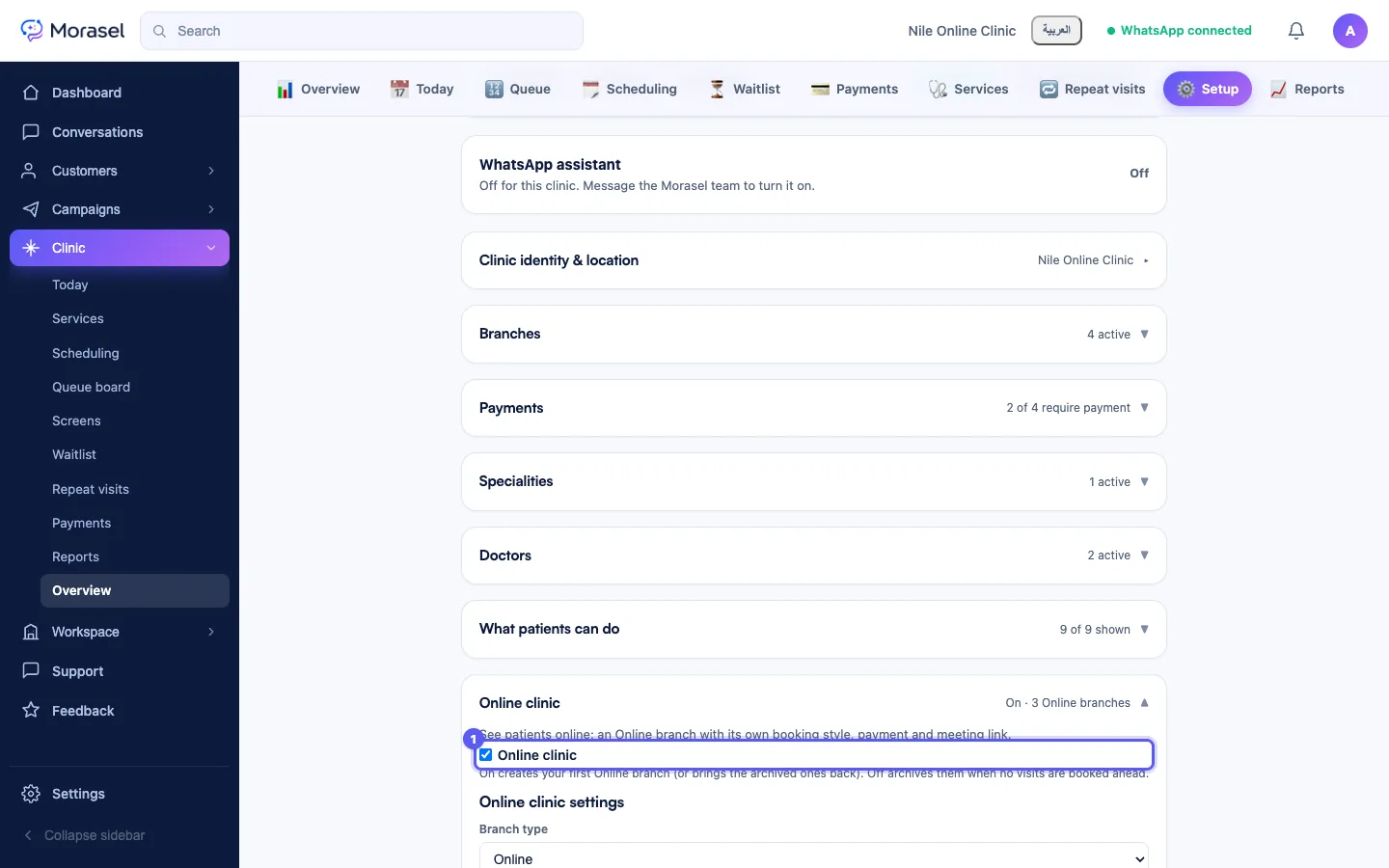
Open Clinic → Setup and turn on the "Online clinic" switch.
Görmeniz gereken: On creates your first Online branch, or brings archived ones back. Off archives the Online branches when no visits are booked ahead; otherwise it says "Move or cancel the N upcoming visits at the Online branches first." Turning it off asks you to confirm first. Only owners and admins can change these settings; everyone else sees them read-only.
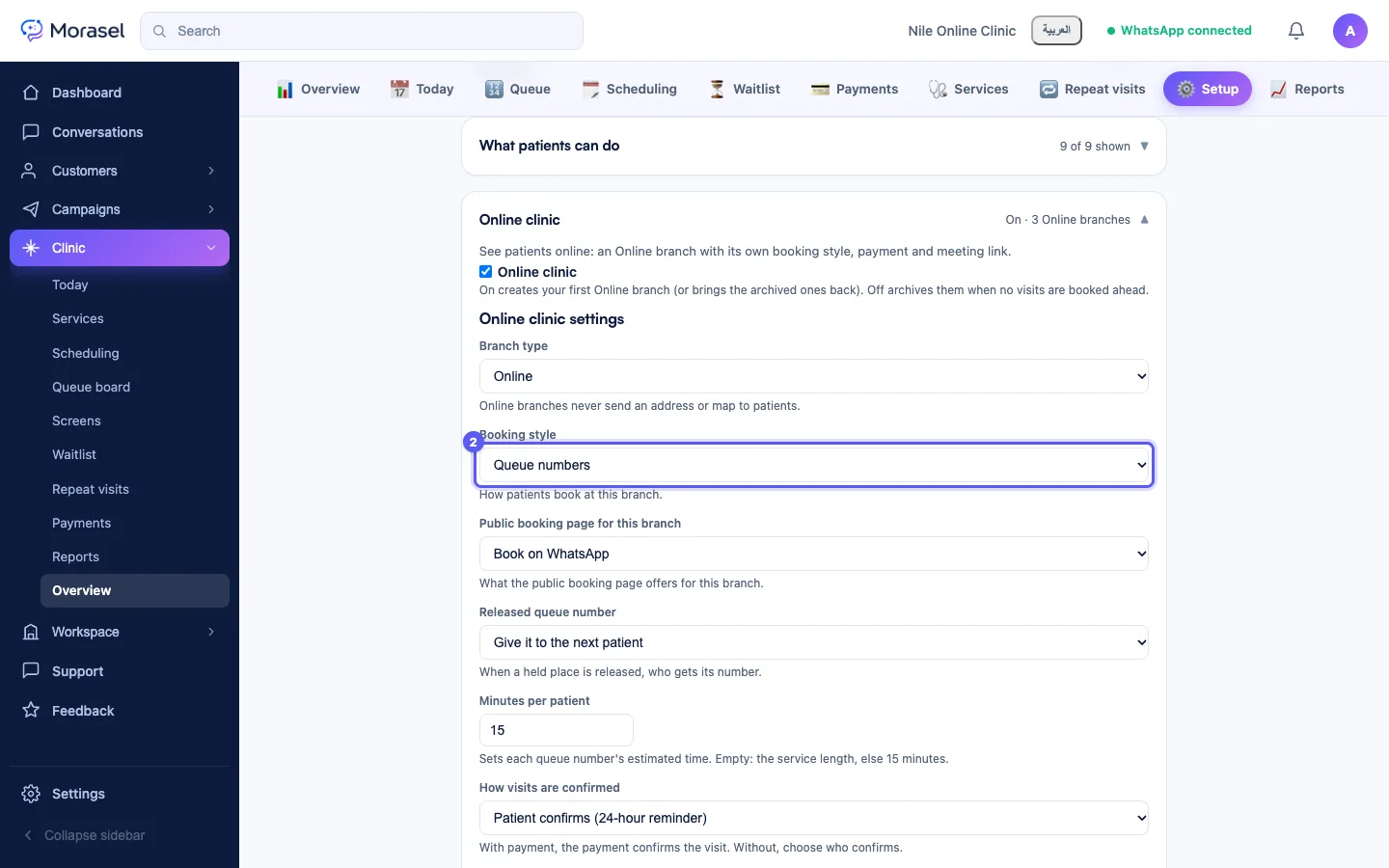
Open the Online branch's settings and choose its Branch type, Booking style, Public booking page, Released queue number and Minutes per patient.
Görmeniz gereken: Booking style is Same as clinic, Time slots or Queue numbers, and it can't change while visits are booked ahead ("Move or cancel the N upcoming visits at this branch first."). Public booking page is Normal, Book on WhatsApp or Hidden. Released queue number either gives a freed number to the next patient or keeps counting. Minutes per patient sets each queue number's estimated time: empty uses the service length, else 15 minutes (5–120). "Released queue number" and "Minutes per patient" show only for a branch that takes queue numbers.
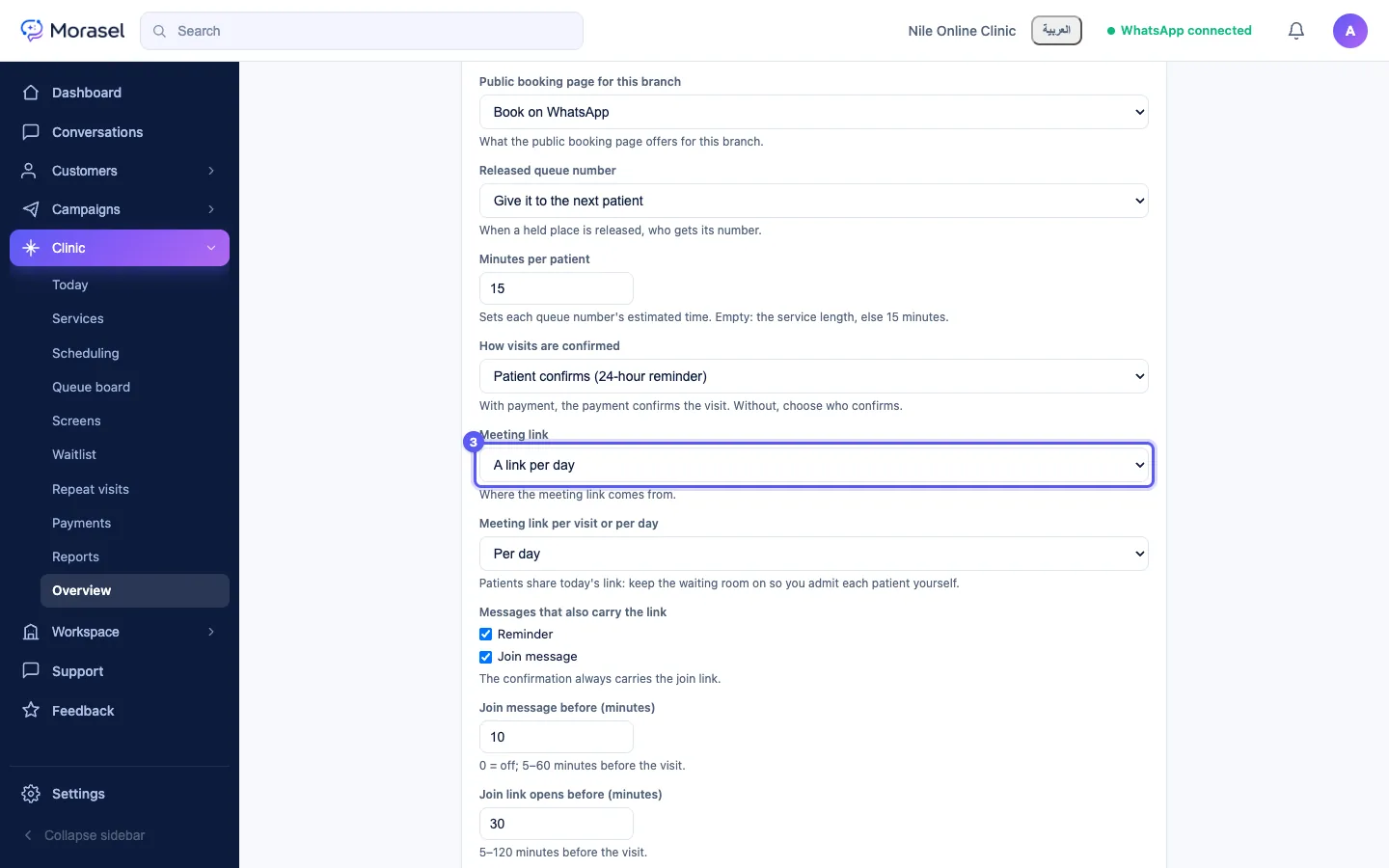
Choose How visits are confirmed and the Meeting link.
Görmeniz gereken: "Patient confirms (24-hour reminder)" is the default; "Doctor confirms" leaves it to the doctor. Meeting link is None, One link for the branch, A link per doctor or A link per day. Under "Meeting link per visit or per day", Per day means patients share today's link: keep the waiting room on so you admit each patient yourself. Per visit makes each patient's link when their visit is confirmed.
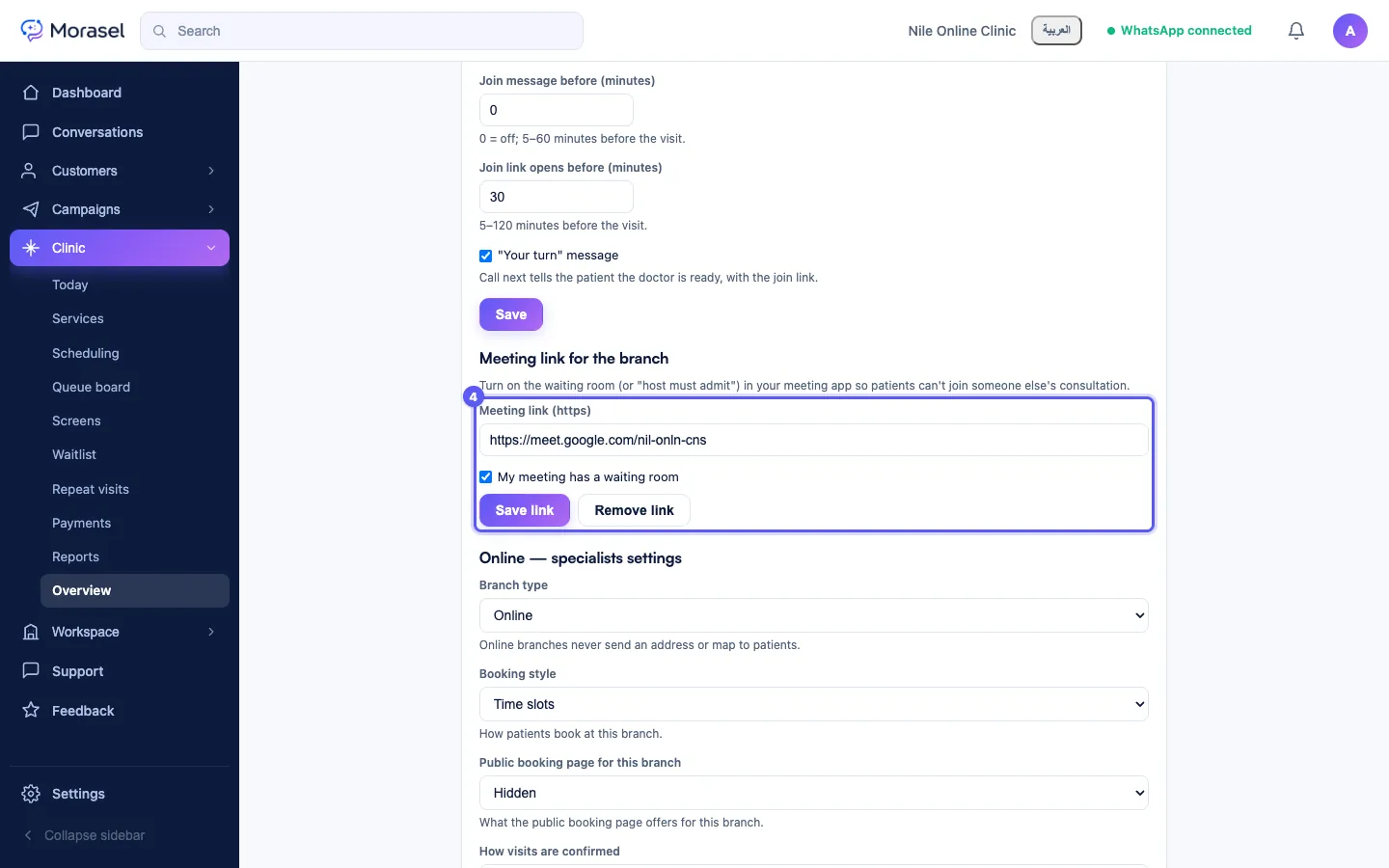
Under "Meeting link for the branch", paste a link that starts with https://, tick "My meeting has a waiting room" and click Save link.
Görmeniz gereken: The link isn't saved without the tick. Turn on the waiting room (or "host must admit") in your meeting app so patients can't join someone else's consultation. Google Meet, Zoom, Teams, Whereby and Jitsi links are known. For any other website the page says "Check this link", patients see a "You're leaving Morasel" page and must tap Continue, and the owner and admins get an alert. This field shows with One link for the branch. With A link per doctor, each doctor of the branch has their own link under "Each doctor's meeting link"; with A link per day, set each doctor's link for the day in the day header on Schedule or on the Queue board. For a branch that takes queue numbers, that is the top of each doctor's card on the Queue board; for time slots, the top of the doctor's column on Schedule.
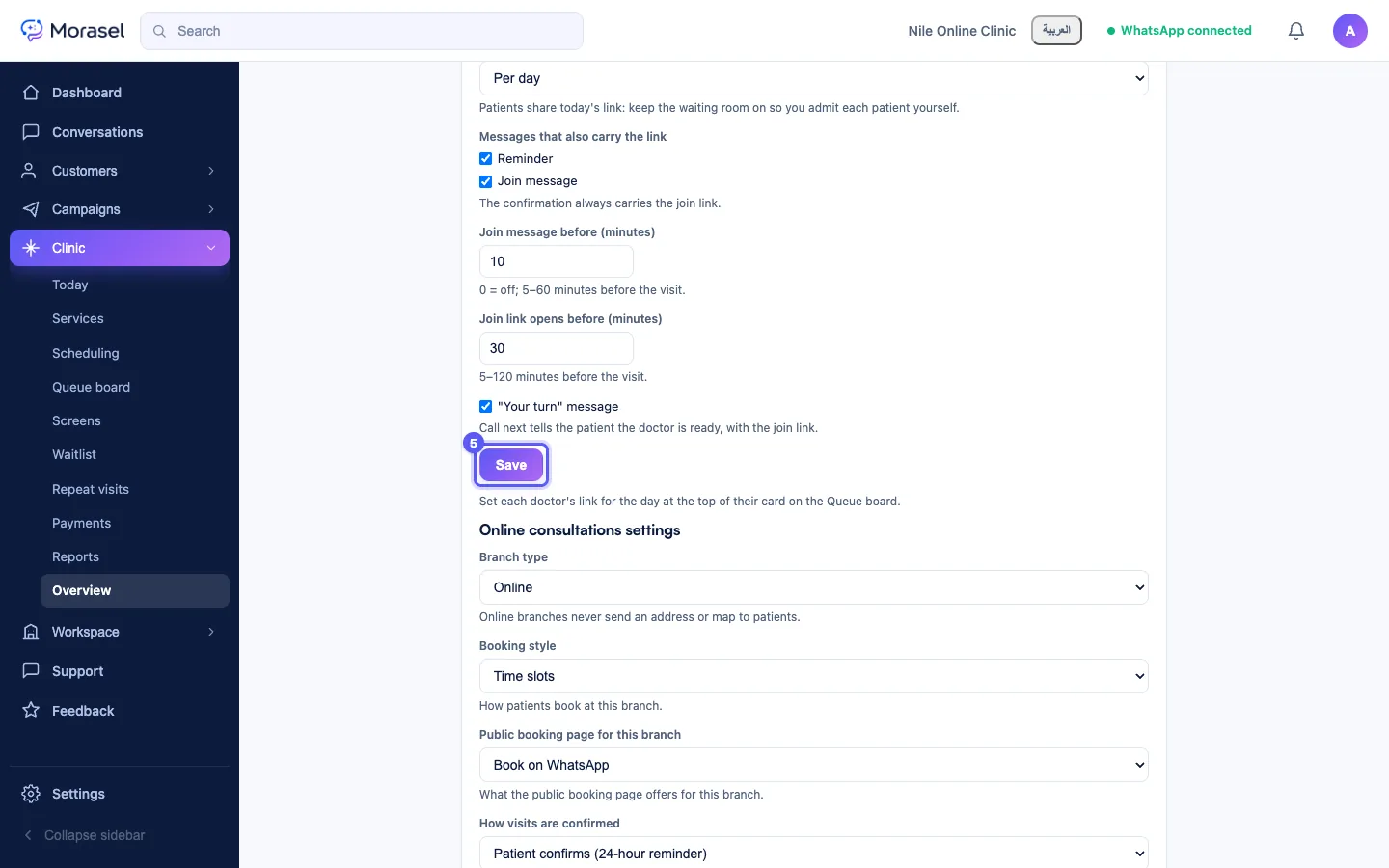
Choose the Messages that also carry the link, Join message before, Join link opens before and the "Your turn" message, then click Save.
Görmeniz gereken: The confirmation always carries the join link; tick Reminder and Join message to add it there too. Join message before is 0 (off) or 5–60 minutes. Join link opens before is 5–120 minutes, 30 by default. With "Your turn" on (the default), Call next tells the patient the doctor is ready, with the join link.
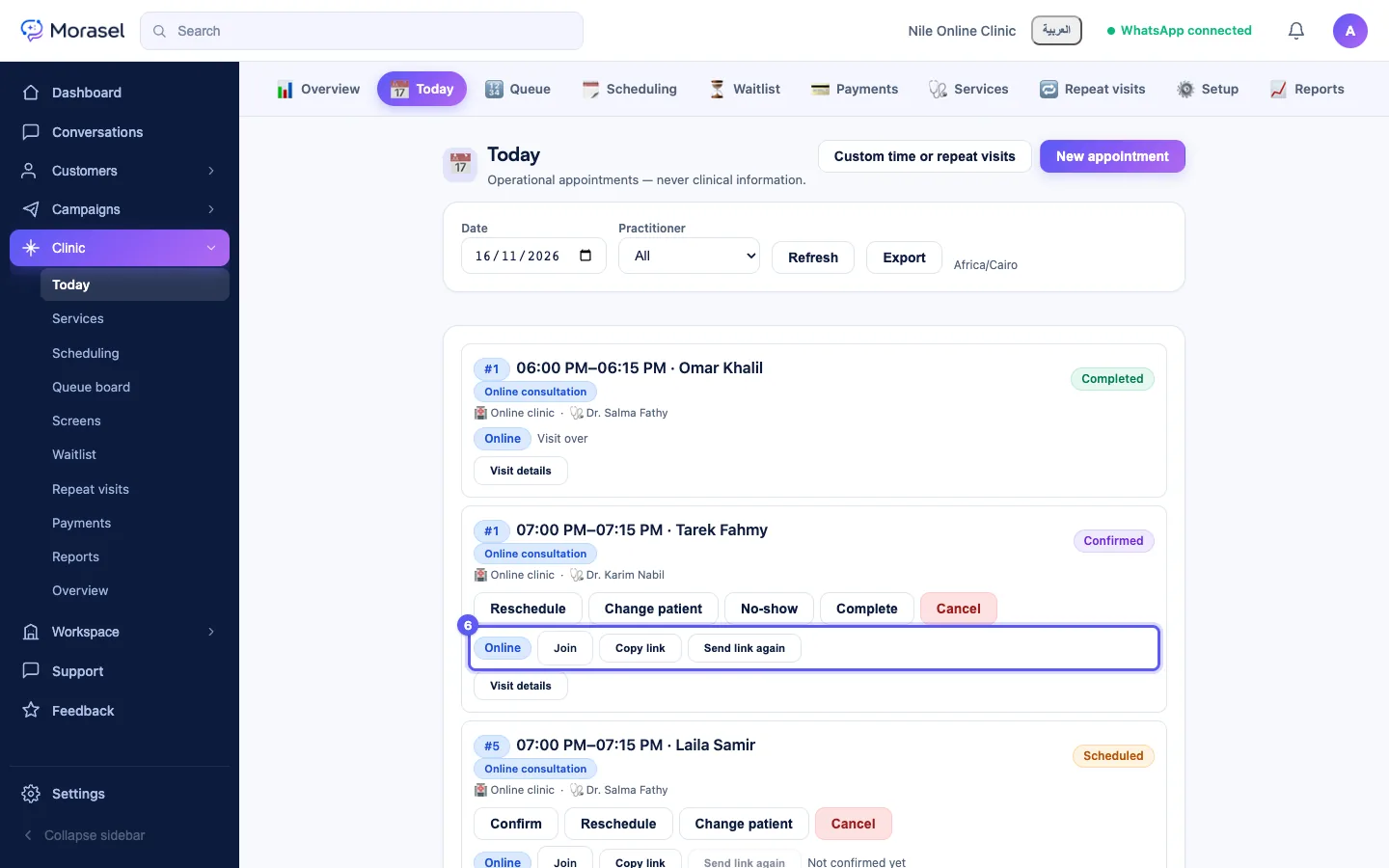
On Today, open an online visit.
Görmeniz gereken: The visit card and its details show the Online badge, Join (the doctor's own meeting link, in a new tab), Copy link, Send link again and New join link. Send link again works for confirmed visits only; otherwise it is greyed out with "Not confirmed yet" or "No meeting link set". New join link (staff only) stops the old link at once and sends the new one if the visit is confirmed. Each works at most once a minute. A visit that is over (completed, no-show or cancelled) shows "Visit over" and no Join or Copy link. Send link again asks you first, then sends the patient the same join link again (it never makes a new one).
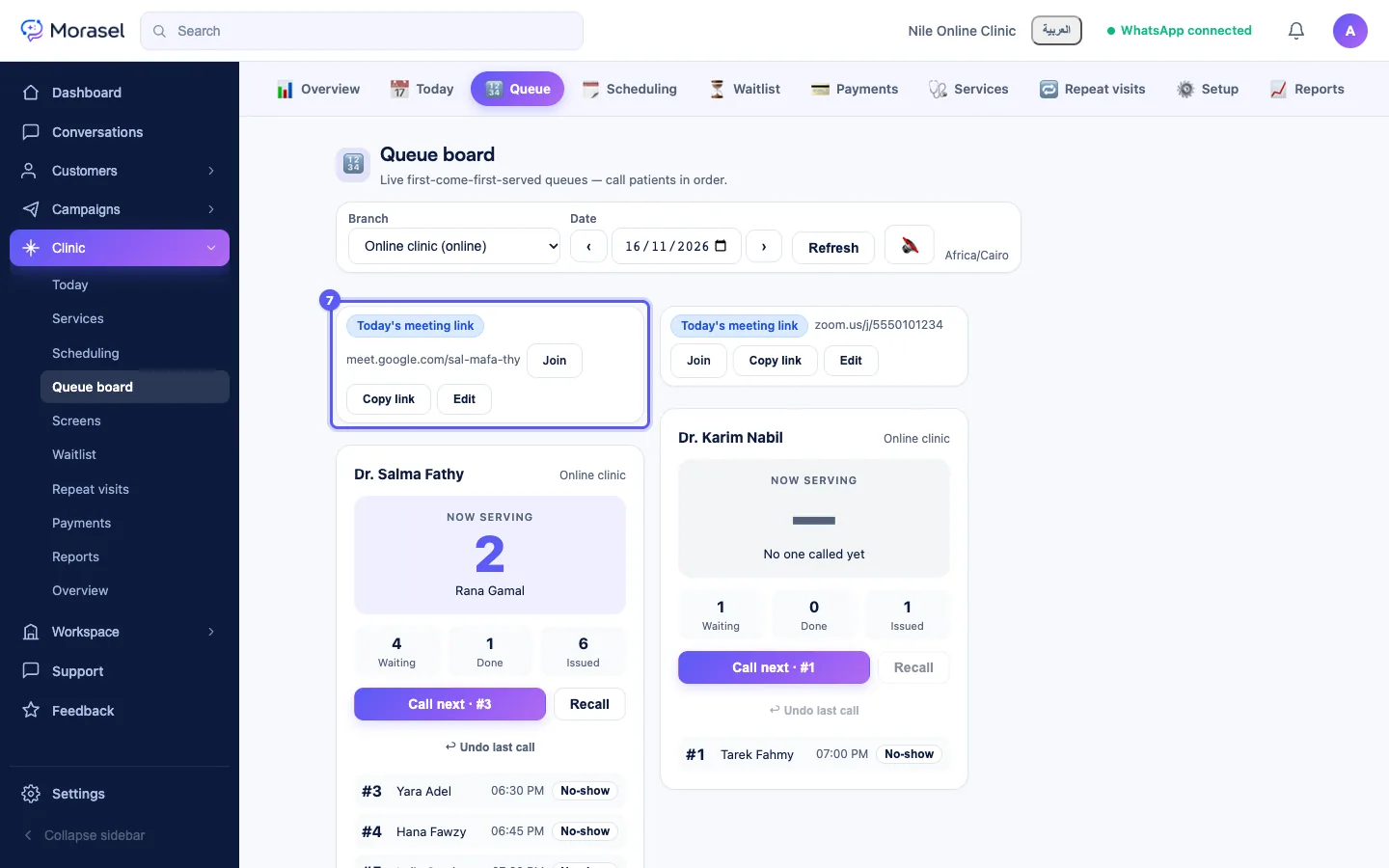
Open the Queue board.
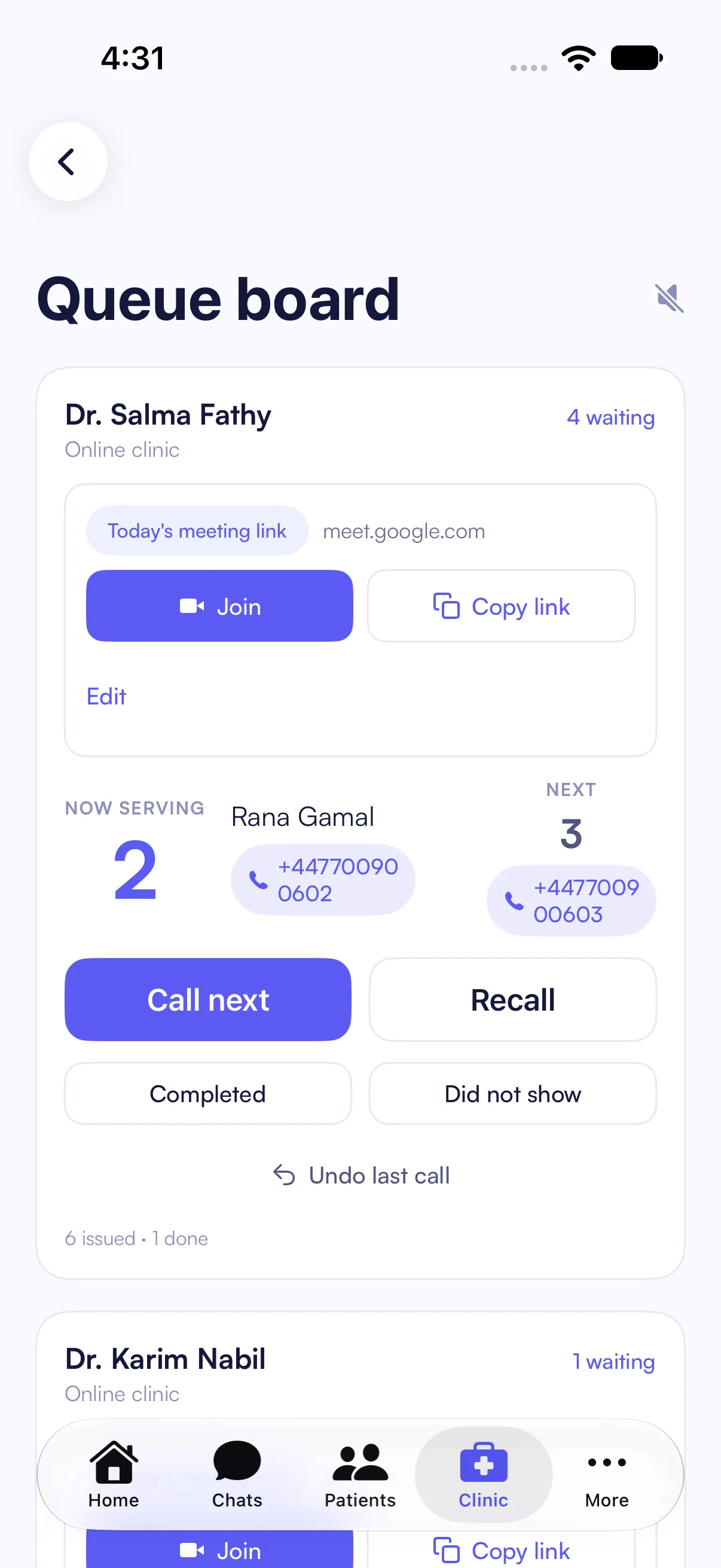
Görmeniz gereken: Choose the branch and the day at the top: every branch is listed, Online ones too, and Previous day and Next day move one day, up to your booking horizon. The board opens on your last branch. Each branch shows by its own booking style, so an Online branch on queue numbers has its numbered cards even when the clinic books time slots. Each doctor's day at an Online branch shows "Today's meeting link": the link in use (labelled Google Meet when Morasel made it), Join and Copy link, and Edit when the branch uses a link per day. Reception can edit the day's link, but only to a known meeting app or the clinic's own meeting website; the owner or an admin can add any other. Schedule (Day · By doctor) shows the same in each doctor's column header. The label reads "Today's meeting link" for today's day link; another date shows the date ("Meeting link · Sat 14 Nov"), and a link for the branch or the doctor reads "Meeting link".


iPhone
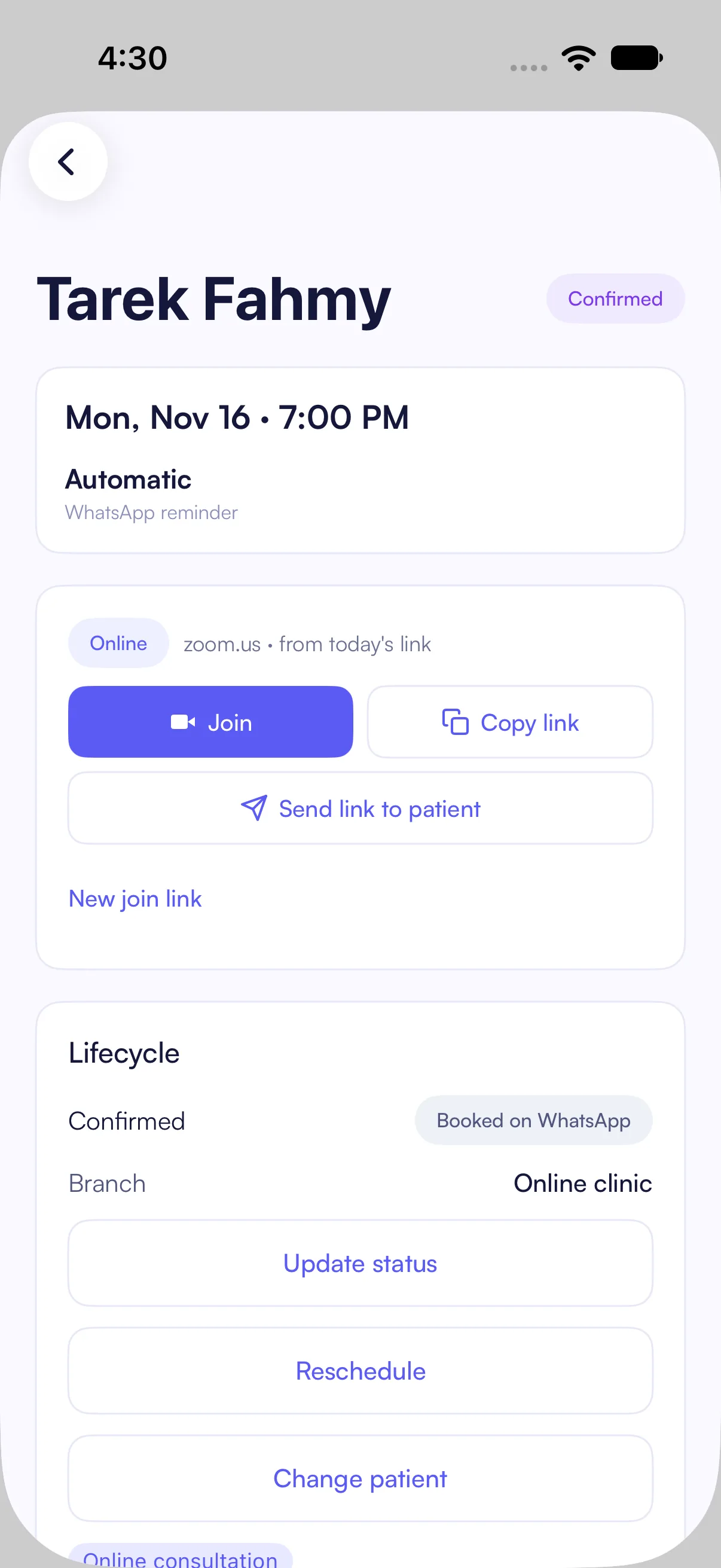
On iPhone or Android, open an online visit.
Görmeniz gereken: The visit shows the Online badge with Join (the doctor's own meeting link), Copy link and Send link again, and New join link for staff. Send link again works for confirmed visits only; otherwise it says "Not confirmed yet" or "No meeting link set". In a list of visits, an online visit's row has Join, and More holds Copy link and Send link again.
Open the Queue board.
Görmeniz gereken: Each doctor's day at an Online branch shows "Today's meeting link" with Join and Copy link, and Edit when the branch uses a link per day.
Android
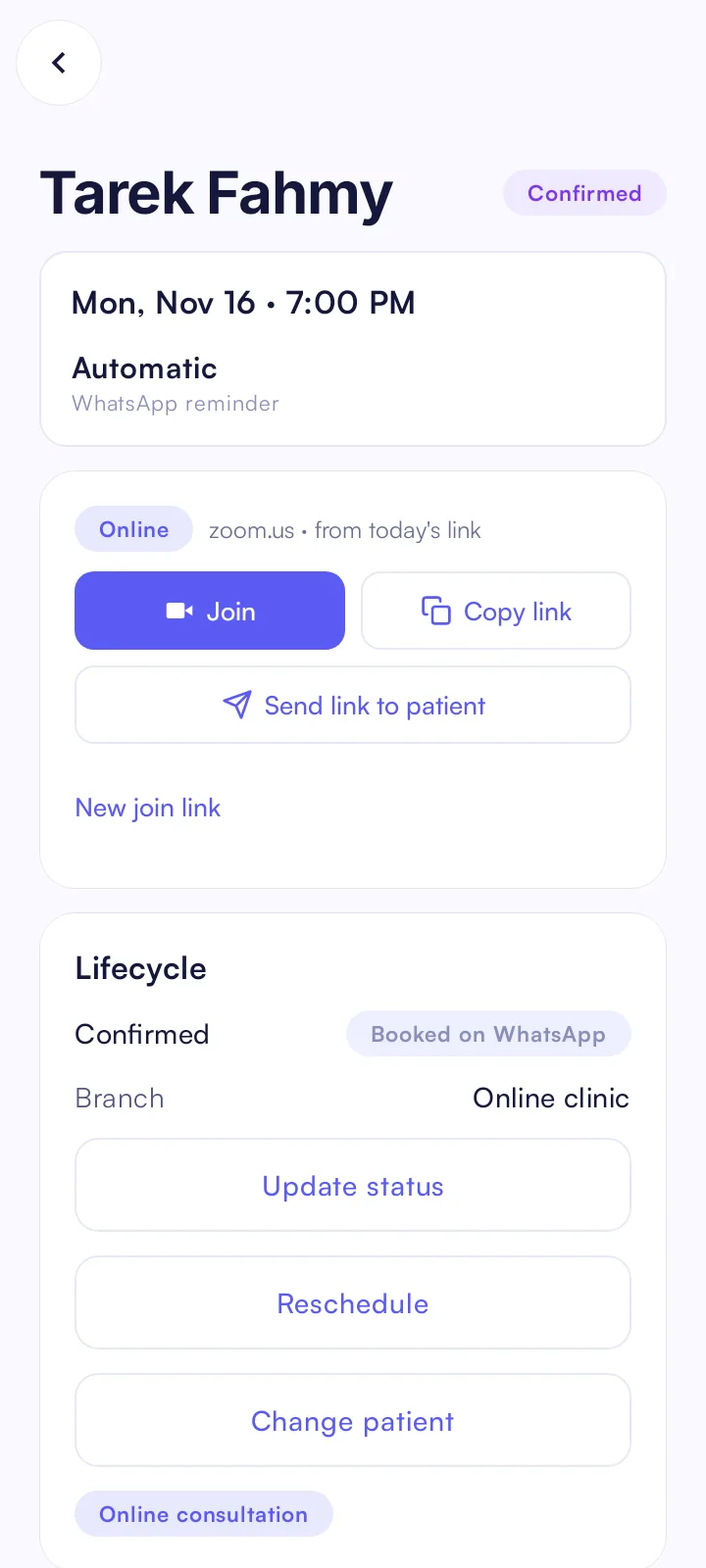
On iPhone or Android, open an online visit.
Görmeniz gereken: The visit shows the Online badge with Join (the doctor's own meeting link), Copy link and Send link again, and New join link for staff. Send link again works for confirmed visits only; otherwise it says "Not confirmed yet" or "No meeting link set". In a list of visits, an online visit's row has Join, and More holds Copy link and Send link again.
Open the Queue board.
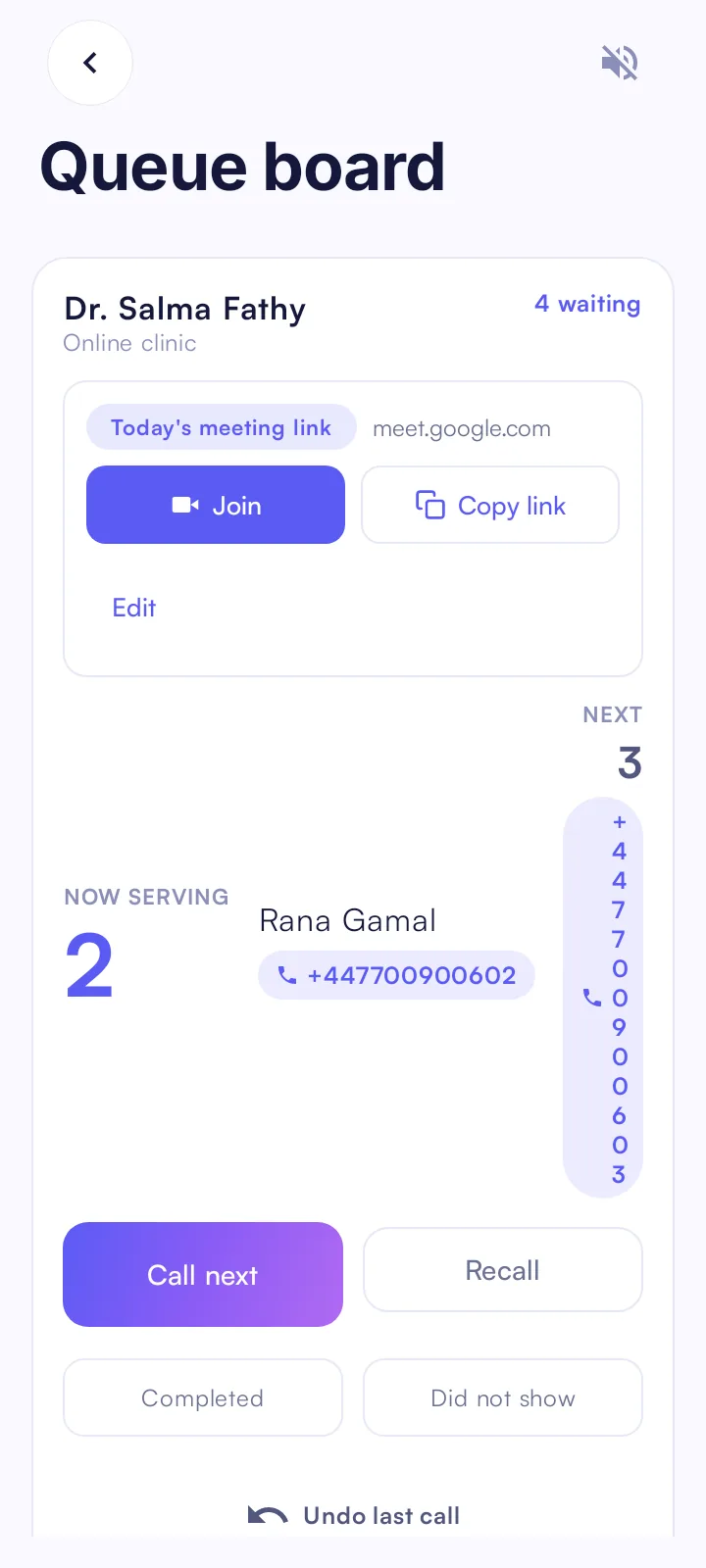
Görmeniz gereken: Each doctor's day at an Online branch shows "Today's meeting link" with Join and Copy link, and Edit when the branch uses a link per day.
İşe yaramadıysa
- Send link again is greyed out.
- It works for confirmed visits only, and the button says why: "Not confirmed yet" or "No meeting link set" (add a link in the Online branch's settings). After a send, wait a minute before sending again.
- I can't turn the online clinic off.
- Off archives the Online branches, which needs them to have no visits booked ahead. Move or cancel the upcoming visits it counts, then turn it off.
- The meeting link won't save.
- Use a link that starts with https:// and tick "My meeting has a waiting room" first. Reception can save a day's link only for a known meeting app or the clinic's own meeting website; ask the owner or an admin for any other.
- Clinic → Setup has no "Online clinic" switch.
- The online clinic is included for every clinic, but only the owner or an admin sees the switch in Clinic → Setup. Ask one of them to turn it on; if they don't see it either, ask us from Support in the app.
Sıkça sorulan sorular
Can I see patients online with Morasel?
Yes. Turn on Clinic → Setup → Online clinic: it adds an Online branch with its own booking style (time slots or queue numbers) and a meeting link from your own meeting app, such as Google Meet, Zoom or Teams. Each confirmed patient gets a join link on WhatsApp.
When can a patient open the join link?
Only once the visit is confirmed, from the Join link opens before time (30 minutes by default) until 60 minutes after the visit ends. Before that the link shows when it opens. A link is never sent before the visit is confirmed.
Do I have to set the meeting link before patients confirm?
No. The join link goes with the confirmation, and it opens whatever meeting link is set when the patient opens it. Set the day's, doctor's or branch link any time before the visit; until then staff get an alert, and a patient who opens the link early waits on a page that opens the meeting by itself.
Do online patients get the clinic's address?
No. Online visits never get an address, a map or directions. Their messages name the time instead, with an estimated time for queue numbers.
Can a patient join someone else's consultation?
Not if your meeting app's waiting room is on: Morasel asks you to confirm it before it saves a link. With a link per day, patients share the link, so admit each patient yourself. If a link reached the wrong person, use New join link: the old one stops at once.
Is the online clinic on iPhone and Android?
The visit buttons (Join, Copy link, Send link again and New join link) and the Queue board's day link are web uygulamasında ve iPhone ile Android uygulamalarında. You set the online clinic up web uygulamasında ve iPhone ile Android uygulamalarında. The web app also works from a phone's browser.
İlgili makaleler
Son güncelleme · Updated: the online clinic settings (the Online clinic switch, the Online branch settings and the meeting links) are now in the iPhone and Android apps too, and the phones' button is called Send link again