
Start a return from a chat or an order
When a customer wants to send something back, you can start the return in Morasel while you chat, instead of switching to Shopify. Morasel creates it in Shopify and shows it on the order, and the customer gets no message from Morasel about it. Owners, admins and agents can start, close and cancel returns; order agents do it from Orders. Returns need Shopify order actions switched on for your workspace and the store's permission to manage returns.
L’application Morasel et ses modèles de messages sont en anglais et en arabe. Ce site est aussi disponible en français.
Cet article n’est disponible qu’en anglais — lisez-le en anglais
Ouvrez cette page dans l’app https://app.morasel.ai/commerce/orders
Étapes
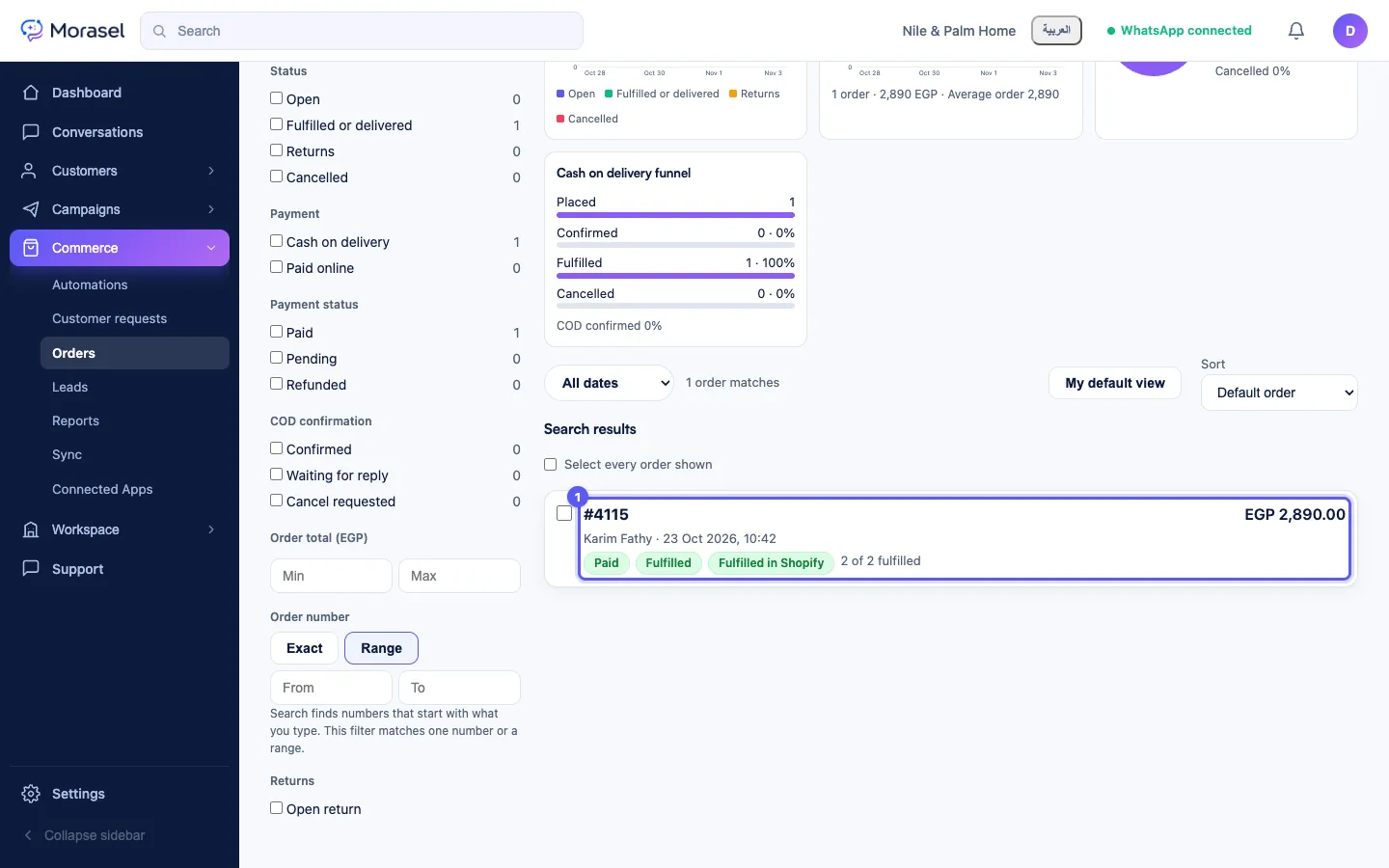
Open the order. From a chat, click Customer orders and pick the order. Or open Commerce → Orders, search for the order number and click the order.
Ce que vous devez voir : The order opens. Start return shows next to Open in Shopify when the order has shipped items and your role can start returns.
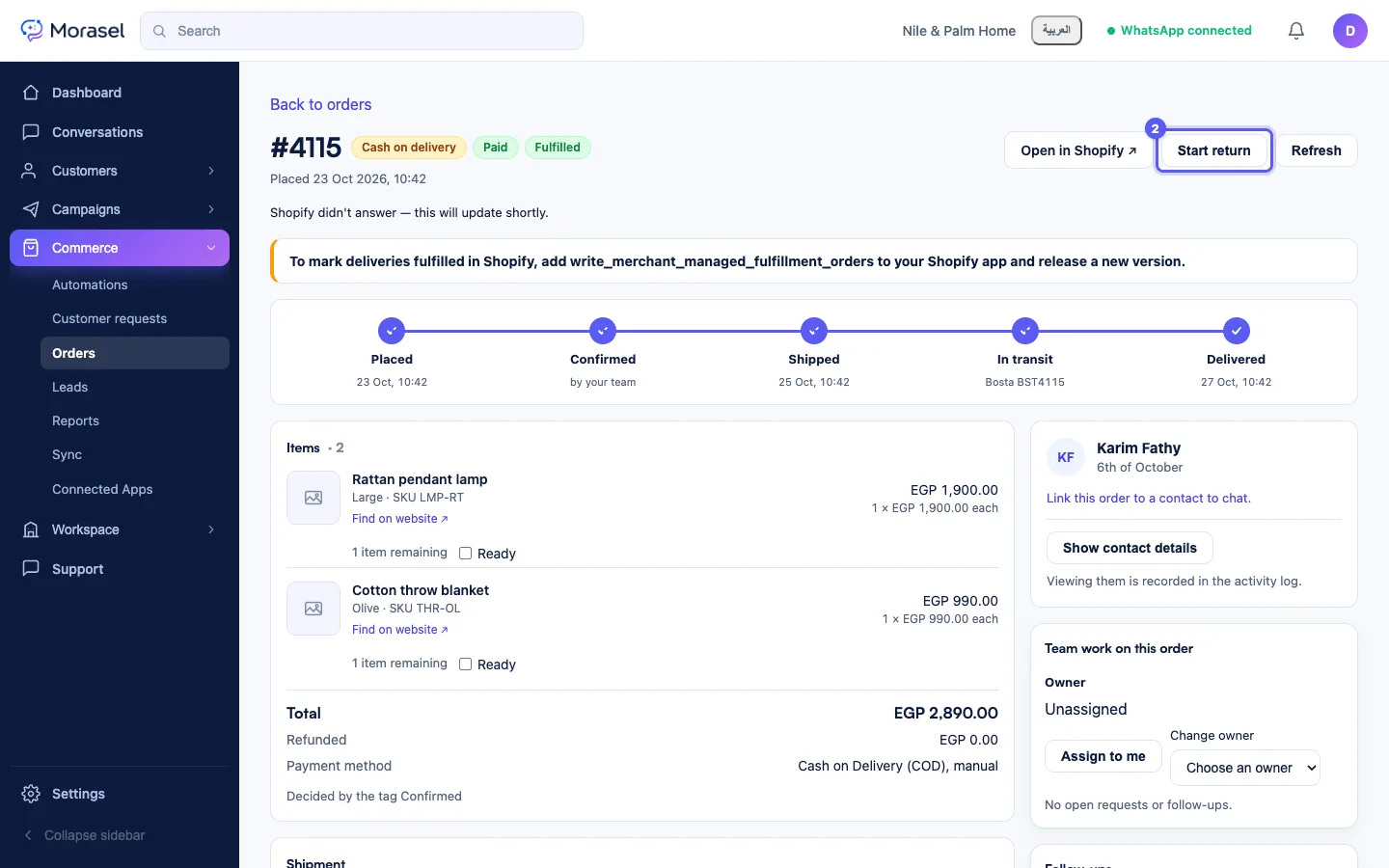
Click Start return.
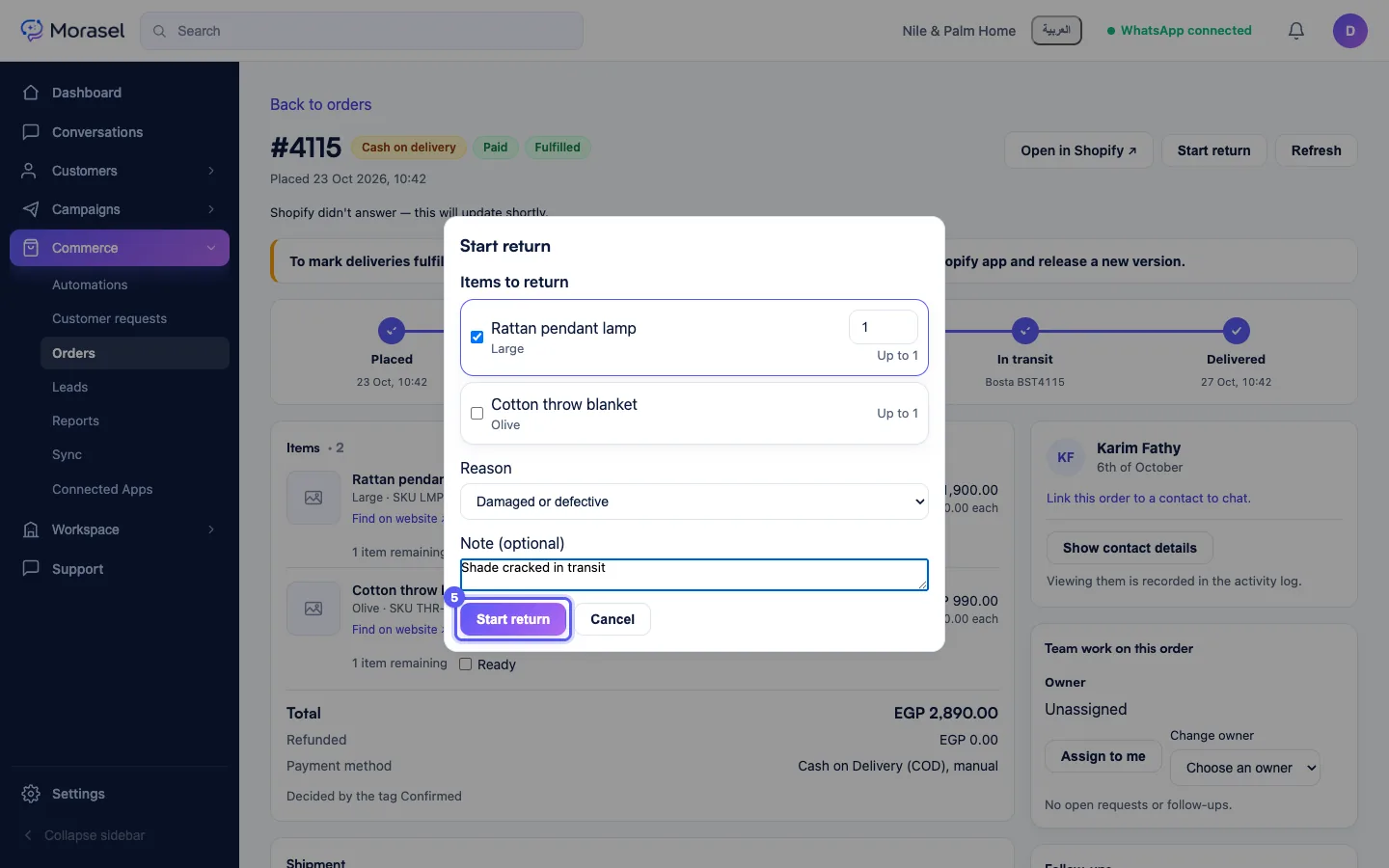
Ce que vous devez voir : Start return opens and asks Shopify which items can still be returned. They are listed under Items to return.
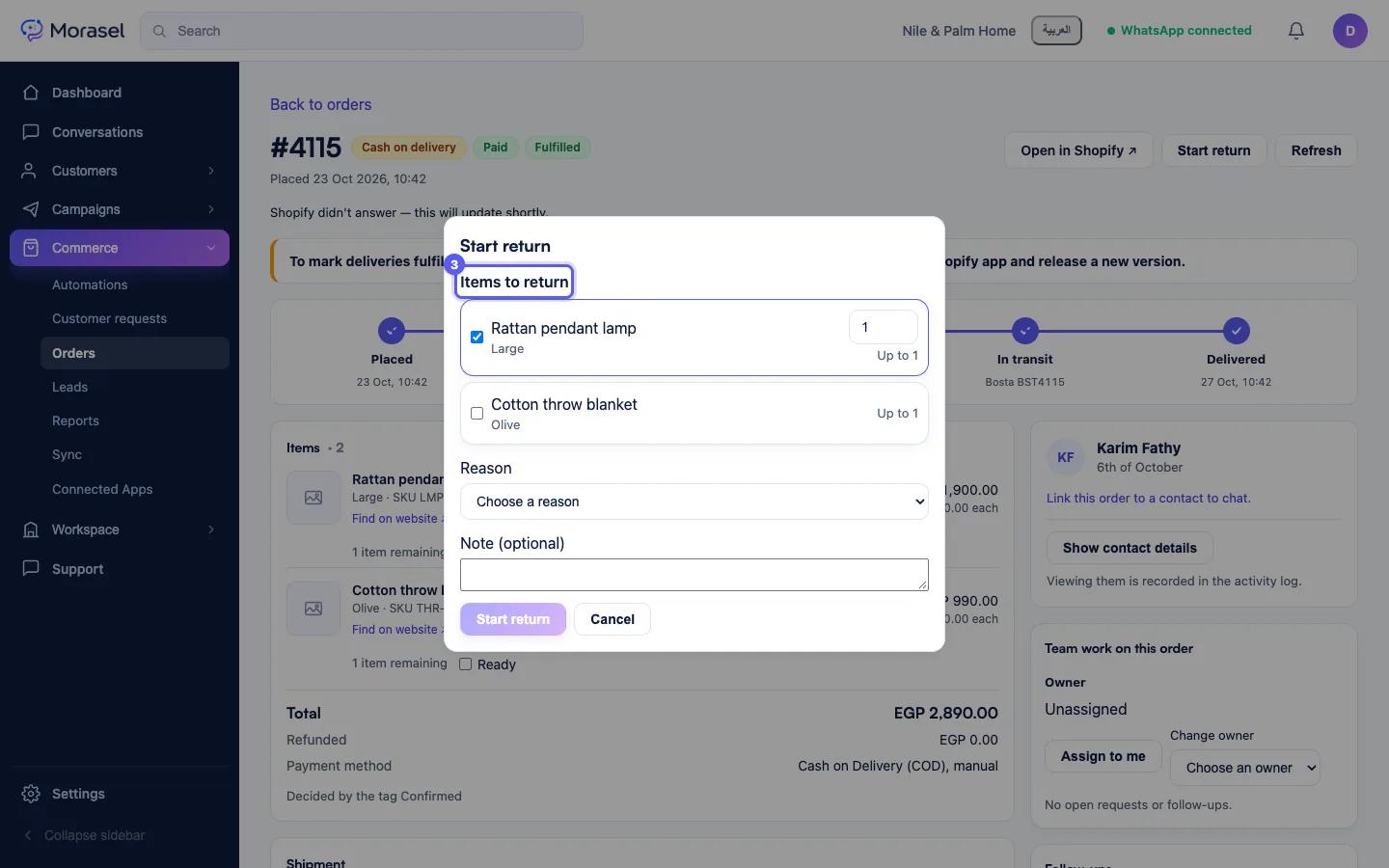
Tick each item the customer is sending back, and set how many. Up to N is the most you can return of that item.
Ce que vous devez voir : The ticked items are outlined. Only shipped items that aren't already returned are listed; when none are left, the sheet says "Only shipped items can be returned."
Choose a Reason. You can add a Note (optional), up to 255 characters; the reason Other needs one. The note is saved on the return in Morasel and in Shopify, where anyone who can see the order in Shopify can read it.
Ce que vous devez voir : The reasons are Shopify's own: Damaged or defective, Received the wrong item, Item not as described, Size was too large, Size was too small, Color, Style, Customer changed their mind and Other.
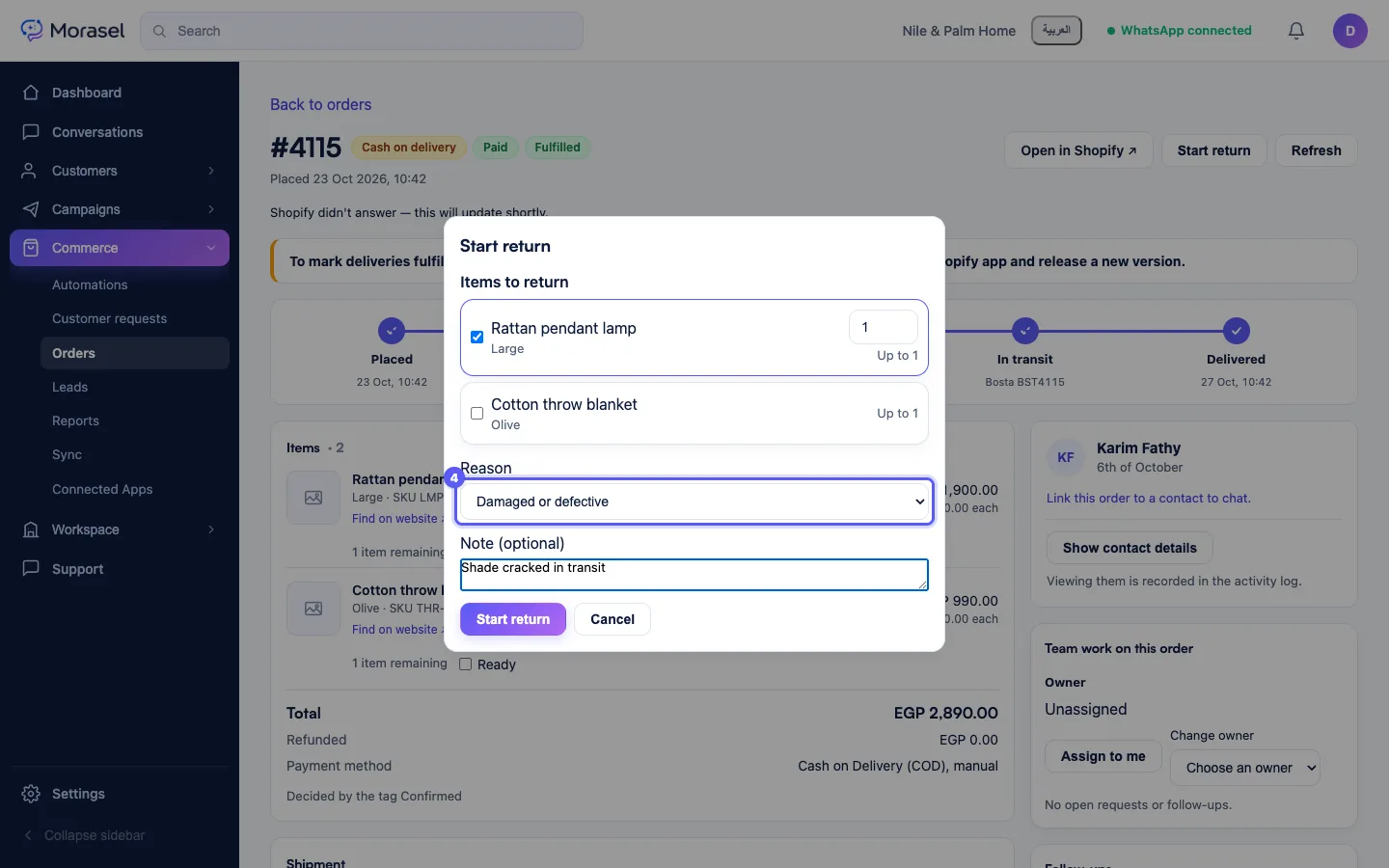
Check the items, reason and note, then click Start return at the bottom of the sheet.
Ce que vous devez voir : Start return can be clicked once at least one item and a reason are chosen. When you click it, Morasel creates the return in Shopify and shows it on the order as Return open, with "Started by <your name> · <time>". Activity adds "Return #4115-R1 started by <your name>", and the customer's chat gets a line only your team can see: "Return #4115-R1 started by <your name>". The customer gets no message.
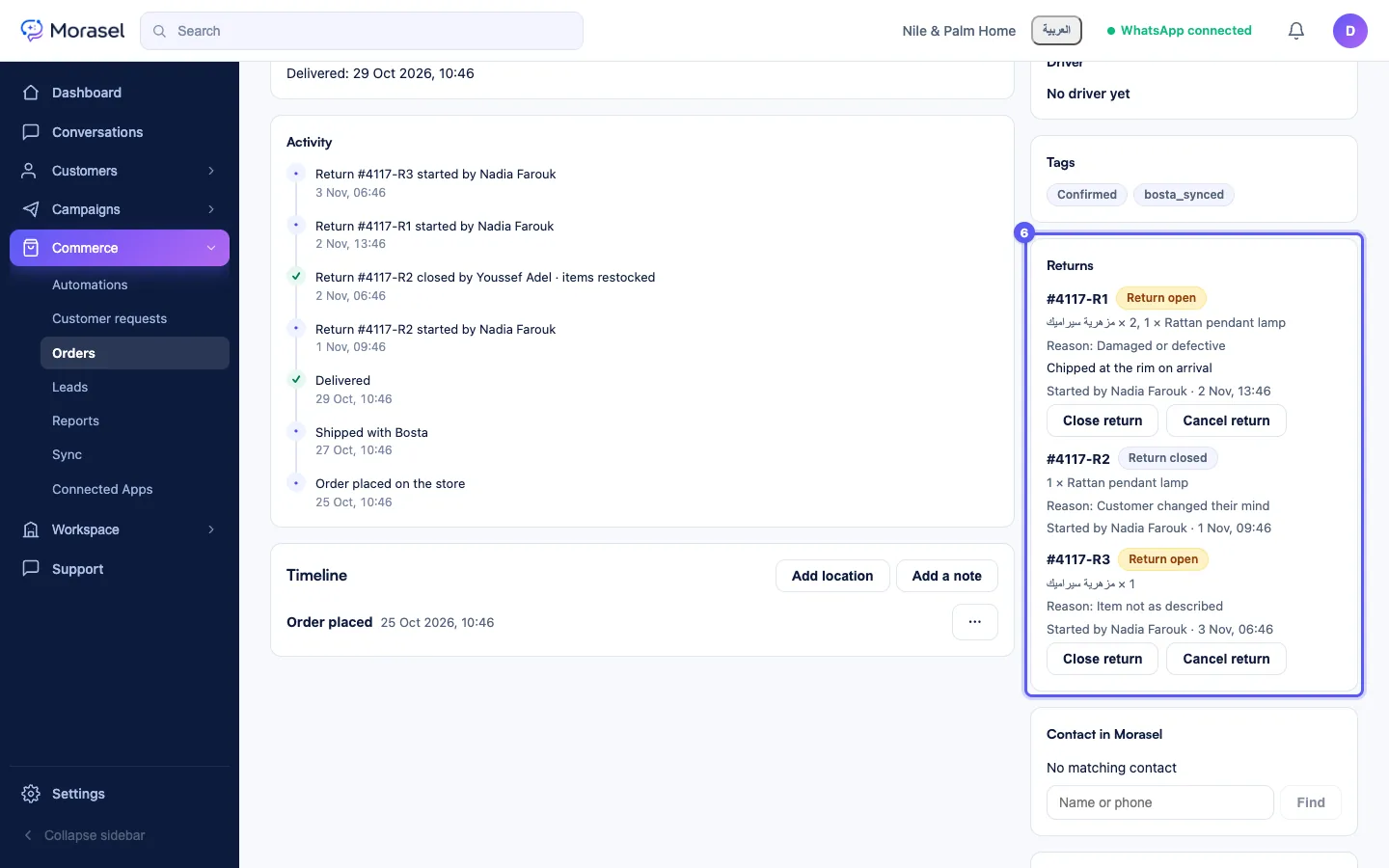
Find the return in the order's Returns section.
Ce que vous devez voir : Each return shows its name, Return open, Return requested or Return closed, the items, the reason, the note and who started it. Open returns have Close return and Cancel return. A return the customer asked for in Shopify reads Return requested and has Review in Shopify instead: review it there.
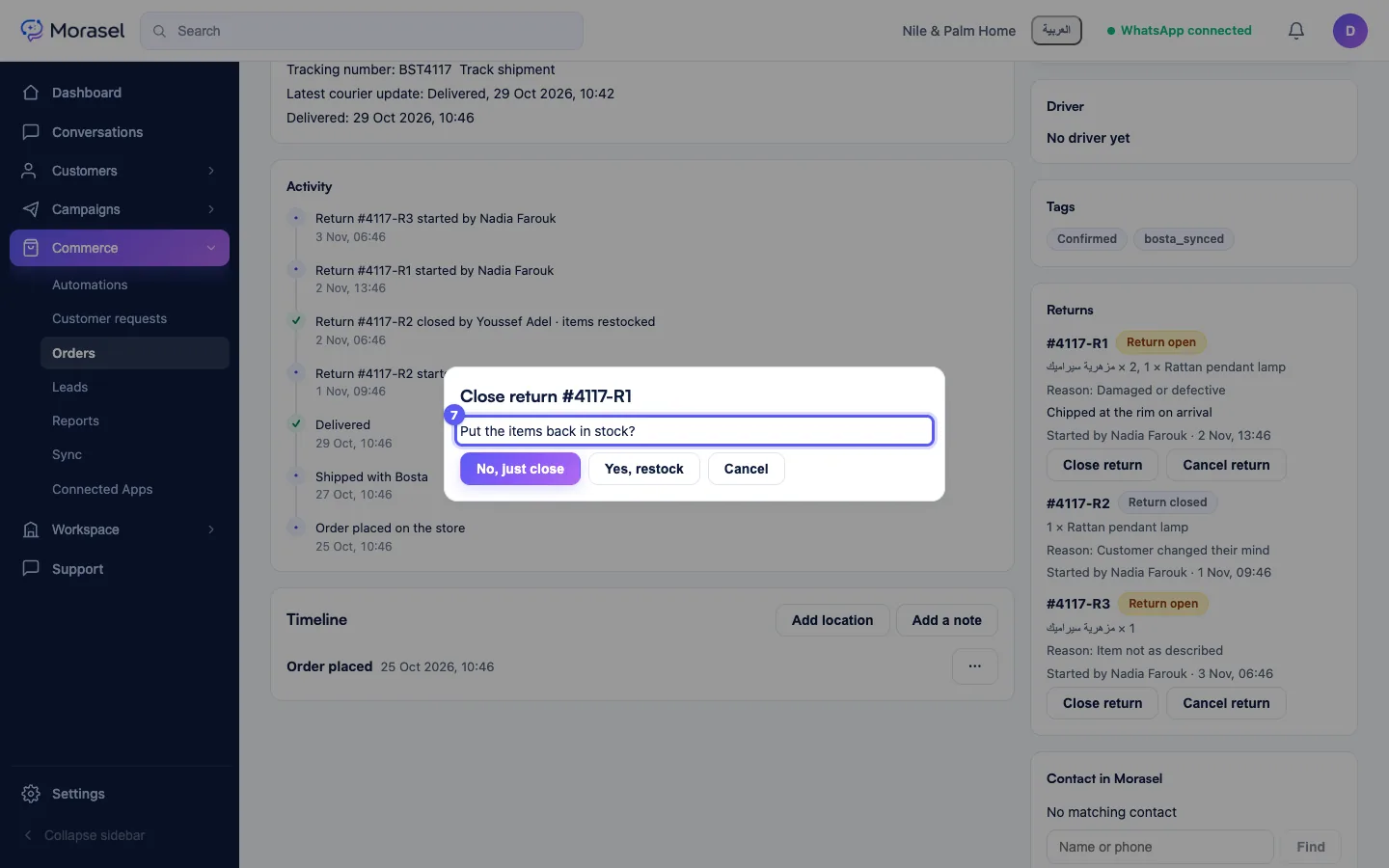
When the items are back with you, click Close return.
Ce que vous devez voir : Morasel asks "Put the items back in stock?" every time. No, just close (the first choice) closes the return and leaves stock as it is; Yes, restock puts each item back in stock at the location that shipped it. Activity adds "Return #4117-R1 closed by <your name>", with "· items restocked" when you restocked.
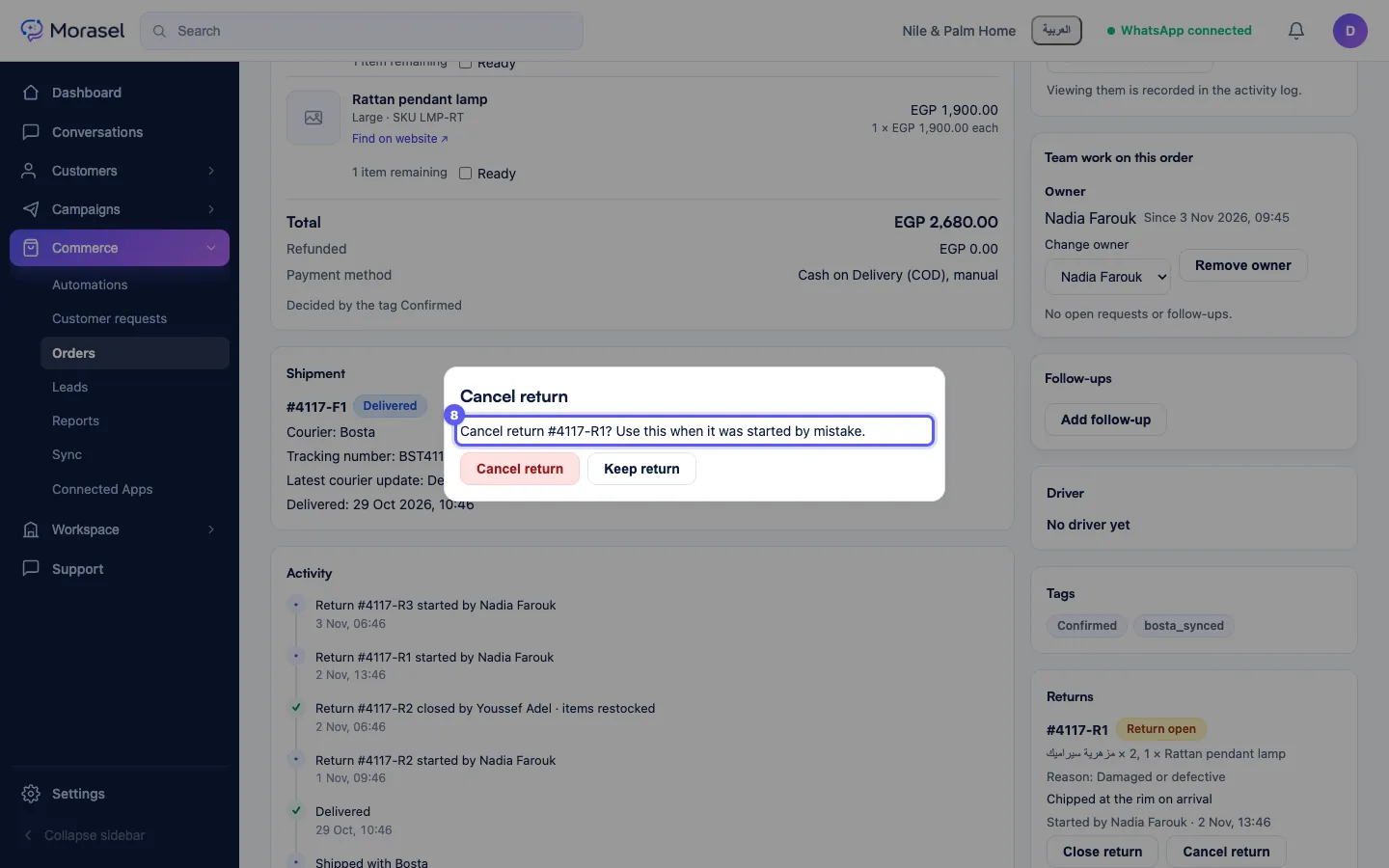
If a return was started by mistake, click Cancel return instead.
Ce que vous devez voir : Morasel asks "Cancel return #4117-R1? Use this when it was started by mistake." Cancel return cancels it in Shopify; Keep return leaves it open.
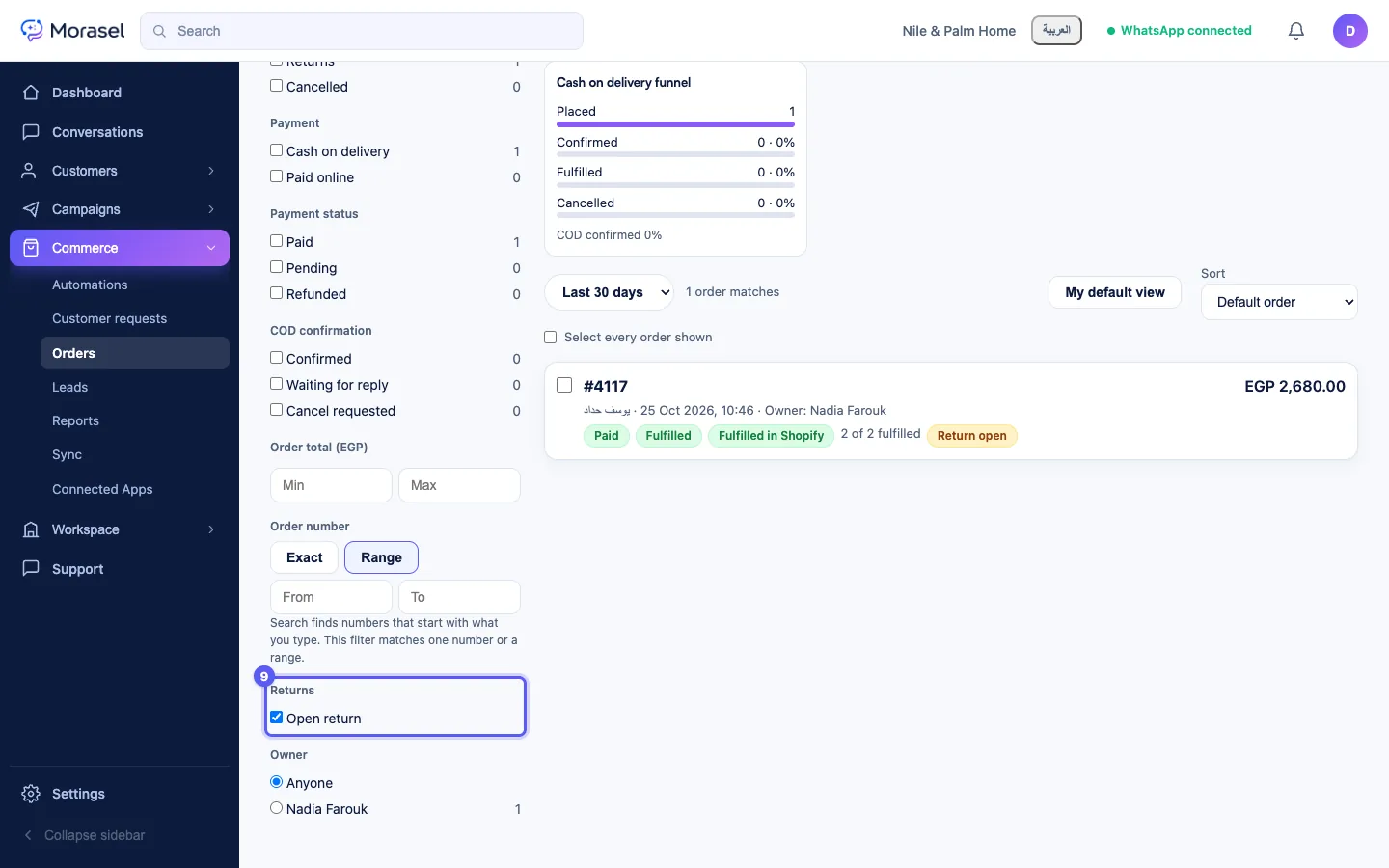
To see every order with a return still to finish, open Commerce → Orders, choose All orders and, in Filters, tick Open return under Returns.
Ce que vous devez voir : Orders lists only orders with an open or requested return, each with its Return open or Return requested badge (widen the dates, for example to Last 30 days, for older orders). The Returns status (it used to read Returned) lists the orders Shopify shows with a return requested, in progress or returned; a cancelled order counts as Cancelled instead.


Si cela n’a pas fonctionné
- The order says "Ask the store owner to allow returns in Shopify" and has no Start return.
- The store's app in Shopify doesn't have the returns permission yet. The store owner adds write_returns (the Returns group of the Shopify setup guide) to a new app version in the Shopify Dev Dashboard, releases it and approves it on the store, then clicks Re-check on the store in Connected Apps.
- "Couldn't reach Shopify. Tap Retry. Morasel checks Shopify first, so the return is never made twice."
- Click Retry: Morasel sends the same return again and checks Shopify first, so you never get two. While it waits, the items and reason are locked. To change them, click Start over: Morasel reads the items from Shopify again first.
- "Morasel couldn't tell which location these items shipped from, so nothing was restocked."
- Shopify didn't say where the items shipped from, so Morasel restocked nothing and the return is still open. Click Close without restocking, then put the items back in stock in Shopify yourself. If it keeps happening, the store owner can add the read_locations permission (the Catalog group of the Shopify setup guide) to the store's app, so Shopify can tell Morasel where items shipped from, then click Re-check on the store.
- "Shopify can't cancel this return because work has started on it. Close it instead."
- Shopify only cancels a return nothing has been done on yet. Click Close return and choose whether to restock.
- "The items were restocked, but Shopify didn't close the return. Tap Retry closing: nothing is restocked again."
- The items are already back in stock in Shopify; only the close didn't go through. Click Retry closing: Morasel closes the return without restocking anything again.
- "This return is being changed right now. Wait a moment, then try again."
- Someone else, or another tap of yours, is closing or cancelling the same return. Wait a moment, then try again; the order reloads with what happened.
- "Some items were already returned or haven't shipped yet."
- Shopify's numbers changed while the sheet was open, for example someone returned the same item in Shopify. The list reloads: choose again from what is left.
- There is no Start return on the order.
- Start return shows only on an order that isn't cancelled and has shipped items, to owners, admins, agents and order agents (drivers can't start returns), while the store is connected. "Returns are paused for this workspace." means Morasel has paused Shopify actions for your workspace for now; you can still manage the return in Shopify.
Questions fréquentes
Does the customer get a message when I start a return?
No. Morasel never messages the customer about a return. The line "Return #4117-R1 started by Nadia" in the chat is a team-only note, like an internal note: the customer never sees it. Tell the customer yourself in the chat what happens next.
Who can start, close and cancel returns?
Owners, admins, agents and order agents. Drivers can't. In Team & Access, the role permissions list it as "Start and close returns". Order agents have no inbox, so they start returns from the order in Orders.
Can I do this in the iOS and Android apps?
Starting, closing and cancelling returns is available sur l’app web et dans les apps iPhone et Android. In the app, open the order: Start return is in the header of its Returns section. Older versions of the app show returns read-only.
Where does a restocked item go?
Back in stock at the location that shipped it, in Shopify. Morasel only changes stock when you choose Yes, restock.
What about returns the customer asked for in Shopify?
They show on the order as Return requested, read-only, with Review in Shopify: accept or decline them there. Once you accept one in Shopify, it shows as Return open and you can close it from Morasel.
Articles associés
Dernière mise à jour · New: start a return from a chat or an order, close it with or without restocking, cancel it, and filter Orders by open returns; available sur l’app web et dans les apps iPhone et Android